<?xml version="1.0" encoding="utf-8"?><feed xmlns="http://www.w3.org/2005/Atom" xml:lang="en-US"><generator uri="https://jekyllrb.com/" version="3.10.0">Jekyll</generator><link href="https://januszpxyz.github.io/feed.xml" rel="self" type="application/atom+xml" /><link href="https://januszpxyz.github.io/" rel="alternate" type="text/html" hreflang="en-US" /><updated>2026-07-27T12:25:49+02:00</updated><id>https://januszpxyz.github.io/feed.xml</id><title type="html">dotNote</title><subtitle>Software engineering, startups, and tech</subtitle><author><name>Janusz Polowczyk Kilis</name></author><entry><title type="html">From `Any` to Type Safety: Revisiting Sentry’s Metrics API</title><link href="https://januszpxyz.github.io/software/2026/03/22/from-any-to-type-safety-revisiting-sentry-metrics-api.html" rel="alternate" type="text/html" title="From `Any` to Type Safety: Revisiting Sentry’s Metrics API" /><published>2026-03-22T18:53:00+01:00</published><updated>2026-03-22T18:53:00+01:00</updated><id>https://januszpxyz.github.io/software/2026/03/22/from-any-to-type-safety-revisiting-sentry-metrics-api</id><content type="html" xml:base="https://januszpxyz.github.io/software/2026/03/22/from-any-to-type-safety-revisiting-sentry-metrics-api.html"><![CDATA[<p>After a long period of inactivity, I am coming back with a new blog post. Between wrapping up a few personal projects I was eager to complete, I hadn’t found the time to explore the topics I wanted to write about. All of that changed when I attended the Mobileheads meetup hosted by Sentry in Vienna on the 18th of March.
. It was a very interesting evening filled with great talks from developers working at the company. Stefan Pölz’s presentation about observability in .NET Maui gave me insight into C# and some of the challenges he’s facing when working with both the language and the framework on a day to day basis. But, given my affinity for Swift, the talk that inspired me to write this blog post was <a href="https://sentry.engineering/about/philniedertscheider">Phil Niedertscheider</a>’s presentation about type safety in Swift and how he’s utilizing the power of Protocol Oriented Programming in the new Metrics API in Sentry Cocoa SDK. Before I dive deep into the topic and present some findings, two important things:</p>

<ol>
  <li>I will focus only on one section of Phil’s presentation, namely dealing with heterogeneous arrays in Swift and the challenges that this particular issue poses. If you’re interested in the topic, then I cannot recommend enough his blog posts: <a href="https://sentry.engineering/blog/building-type-safe-metrics-api-in-swift-part-i">Building Type Safe Metrics API in Swift Part I</a> and part two: <a href="https://sentry.engineering/blog/building-type-safe-metrics-api-in-swift-part-ii">Building Type Safe Metrics API in Swift Part II</a></li>
  <li>I may be completely wrong about everything that I write here and this whole blog post could be labeled as “talking out of my ass”, but I am more than happy to be proven wrong as it’s the only way to learn.</li>
</ol>

<p>Having these two things out of the way, let’s proceed and briefly describe what is the issue we’re dealing with here.</p>

<h2 id="heterogeneous-arrays-and-the-problem-with-any">Heterogeneous Arrays and The Problem with <strong><code class="language-plaintext highlighter-rouge">Any</code></strong></h2>

<p>By definition, Arrays in Swift are homogeneous. <strong><code class="language-plaintext highlighter-rouge">[T]</code></strong> means every element is the same type <strong><code class="language-plaintext highlighter-rouge">T</code></strong>. This isn’t a limitation so much as a <strong>guarantee:</strong> compiler knows what it’s working with. However, in the case that Sentry is dealing with here, this assumption is quickly broken by the attribute values. A single metric event might carry a string endpoint, an integer count, or a boolean flag. All are valid, but different types. The naive solution is to use <strong><code class="language-plaintext highlighter-rouge">Any</code></strong>, Swift’s type-erased “escape type”. It compiles, runs, and accepts everything you throw at it. But it comes at a cost, as Phil puts it: “<em>One major drawback of using <strong><code class="language-plaintext highlighter-rouge">Any</code></strong> as the value of our attributes is missing compile-time hints if the passed-in value is not one of our supported attribute value types.”</em></p>

<p>The solution to the <strong><code class="language-plaintext highlighter-rouge">Any</code></strong> headache in Sentry’s case was to define an enum type with associated values, <strong><code class="language-plaintext highlighter-rouge">SentryAttributeContent</code></strong>, which looks like this:</p>

<div class="language-swift highlighter-rouge"><div class="highlight"><pre class="highlight"><code><span class="kd">enum</span> <span class="kt">SentryAttributeContent</span> <span class="p">{</span>
    <span class="k">case</span> <span class="nf">string</span><span class="p">(</span><span class="kt">String</span><span class="p">)</span>
    <span class="k">case</span> <span class="nf">boolean</span><span class="p">(</span><span class="kt">Bool</span><span class="p">)</span>
    <span class="k">case</span> <span class="nf">integer</span><span class="p">(</span><span class="kt">Int</span><span class="p">)</span>
    <span class="k">case</span> <span class="nf">double</span><span class="p">(</span><span class="kt">Double</span><span class="p">)</span>
    <span class="k">case</span> <span class="nf">stringArray</span><span class="p">([</span><span class="kt">String</span><span class="p">])</span>
    <span class="k">case</span> <span class="nf">booleanArray</span><span class="p">([</span><span class="kt">Bool</span><span class="p">])</span>
    <span class="k">case</span> <span class="nf">integerArray</span><span class="p">([</span><span class="kt">Int</span><span class="p">])</span>
    <span class="k">case</span> <span class="nf">doubleArray</span><span class="p">([</span><span class="kt">Double</span><span class="p">])</span>
<span class="p">}</span>
</code></pre></div></div>

<p>This is Swift’s equivalent of a union type. Instead of accepting anything and hoping for the best at runtime, the compiler now enforces that attribute values are one of these known cases. The call site gets cleaner too, as we’re no more wrapping values manually, just use the enum case syntax:</p>

<div class="language-swift highlighter-rouge"><div class="highlight"><pre class="highlight"><code><span class="kd">protocol</span> <span class="kt">SentryMetricsApiProtocol</span> <span class="p">{</span>
    <span class="kd">func</span> <span class="nf">count</span><span class="p">(</span><span class="nv">key</span><span class="p">:</span> <span class="kt">String</span><span class="p">,</span> <span class="nv">value</span><span class="p">:</span> <span class="kt">UInt</span><span class="p">,</span> <span class="nv">attributes</span><span class="p">:</span> <span class="p">[</span><span class="kt">String</span><span class="p">:</span> <span class="kt">SentryAttributeContent</span><span class="p">])</span>
<span class="p">}</span>

<span class="kt">SentrySDK</span><span class="o">.</span><span class="n">metrics</span><span class="o">.</span><span class="nf">count</span><span class="p">(</span><span class="nv">key</span><span class="p">:</span> <span class="s">"checkout.completed"</span><span class="p">,</span> <span class="nv">value</span><span class="p">:</span> <span class="mi">1</span><span class="p">,</span> <span class="nv">attributes</span><span class="p">:</span> <span class="p">[</span>
    <span class="s">"payment_method"</span><span class="p">:</span> <span class="o">.</span><span class="nf">string</span><span class="p">(</span><span class="s">"apple_pay"</span><span class="p">),</span>
    <span class="s">"cart_items"</span><span class="p">:</span> <span class="o">.</span><span class="nf">integer</span><span class="p">(</span><span class="mi">3</span><span class="p">),</span>
    <span class="s">"total_amount"</span><span class="p">:</span> <span class="o">.</span><span class="nf">double</span><span class="p">(</span><span class="mf">99.99</span><span class="p">)</span>
<span class="p">])</span>
</code></pre></div></div>

<p>The problem is that this <strong><code class="language-plaintext highlighter-rouge">enum</code></strong> is closed. Every type that you want to support must be explicitly declared as a case, and if you want to pass a custom type like <strong><code class="language-plaintext highlighter-rouge">User</code></strong>, for example, you’re out of luck unless you extend the enum yourself.</p>

<p>The cleaner solution is to invert the relationship: instead of the SDK “owning” all possible types in a closed enum, define a protocol that any type can conform to by declaring how it maps to <strong><code class="language-plaintext highlighter-rouge">SentryAttributeContent</code></strong>:</p>

<div class="language-swift highlighter-rouge"><div class="highlight"><pre class="highlight"><code><span class="kd">protocol</span> <span class="kt">SentryAttributeValue</span> <span class="p">{</span>
    <span class="k">var</span> <span class="nv">asSentryAttributeContent</span><span class="p">:</span> <span class="kt">SentryAttributeContent</span> <span class="p">{</span> <span class="k">get</span> <span class="p">}</span>
<span class="p">}</span>
</code></pre></div></div>

<p>Now having this protocol requires us to update the <strong><code class="language-plaintext highlighter-rouge">SentryMetricsApiProtocol</code></strong> API, like so:</p>

<div class="language-swift highlighter-rouge"><div class="highlight"><pre class="highlight"><code><span class="kd">protocol</span> <span class="kt">SentryMetricsApiProtocol</span> <span class="p">{</span>
    <span class="kd">func</span> <span class="nf">count</span><span class="p">(</span><span class="nv">key</span><span class="p">:</span> <span class="kt">String</span><span class="p">,</span> <span class="nv">value</span><span class="p">:</span> <span class="kt">UInt</span><span class="p">,</span> <span class="nv">attributes</span><span class="p">:</span> <span class="p">[</span><span class="kt">String</span><span class="p">:</span> <span class="n">any</span> <span class="kt">SentryAttributeValue</span><span class="p">])</span>
<span class="p">}</span>
</code></pre></div></div>

<p><strong><code class="language-plaintext highlighter-rouge">count</code></strong> function signature uses a boxed protocol type, which accepts any conforming type as a value in the <strong><code class="language-plaintext highlighter-rouge">attributes</code></strong> dictionary. Having all of this in place, we can now leverage Swift’s extensions and extend the types that we need to conform to <strong><code class="language-plaintext highlighter-rouge">SentryAttributeValue</code></strong>. Great, but you may be asking how all of this connects to the arrays that started this whole discussion. And now we get to the part that is very interesting.</p>

<h2 id="encountering-compiler-limitations"><em>Encountering Compiler Limitations</em></h2>

<p>In this section of the Sentry’s blog post, Phil discusses the need to extend Swift’s <strong><code class="language-plaintext highlighter-rouge">Array</code></strong> to conform to the <strong><code class="language-plaintext highlighter-rouge">SentryAttributeValue</code></strong>, but “<em>only if the array contains elements which are one of our supported types.”</em> Turns out that having multiple multiple conformances of the same protocol narrowed down to specific element types is unsupported, so this:</p>

<div class="language-swift highlighter-rouge"><div class="highlight"><pre class="highlight"><code><span class="kd">extension</span> <span class="kt">Array</span><span class="p">:</span> <span class="kt">SentryAttributeValue</span> <span class="k">where</span> <span class="kt">Element</span> <span class="o">==</span> <span class="kt">Int</span> <span class="p">{</span>
    <span class="k">var</span> <span class="nv">asSentryAttributeContent</span><span class="p">:</span> <span class="kt">SentryAttributeContent</span> <span class="p">{</span>
        <span class="o">.</span><span class="nf">integerArray</span><span class="p">(</span><span class="k">self</span><span class="p">)</span>
    <span class="p">}</span>
<span class="p">}</span>

<span class="kd">extension</span> <span class="kt">Array</span><span class="p">:</span> <span class="kt">SentryAttributeValue</span> <span class="k">where</span> <span class="kt">Element</span> <span class="o">==</span> <span class="kt">Double</span> <span class="p">{</span>
    <span class="k">var</span> <span class="nv">asSentryAttributeContent</span><span class="p">:</span> <span class="kt">SentryAttributeContent</span> <span class="p">{</span>
        <span class="o">.</span><span class="nf">doubleArray</span><span class="p">(</span><span class="k">self</span><span class="p">)</span>
    <span class="p">}</span>
<span class="p">}</span> 
</code></pre></div></div>

<p>will result in Swift compiler complaining. What can be done here is to use a generic <strong><code class="language-plaintext highlighter-rouge">where</code></strong> clause with the <strong><code class="language-plaintext highlighter-rouge">SentryAttributeValue</code></strong> protocol introduced earlier. Here’s how it looks like:</p>

<div class="language-swift highlighter-rouge"><div class="highlight"><pre class="highlight"><code><span class="kd">extension</span> <span class="kt">Array</span><span class="p">:</span> <span class="kt">SentryAttributeValue</span> <span class="k">where</span> <span class="kt">Element</span> <span class="o">==</span> <span class="kt">SentryAttributeValue</span> <span class="p">{</span>
    <span class="k">var</span> <span class="nv">asSentryAttributeContent</span><span class="p">:</span> <span class="kt">SentryAttributeContent</span> <span class="p">{</span>
        <span class="k">if</span> <span class="kt">Element</span><span class="o">.</span><span class="k">self</span> <span class="o">==</span> <span class="kt">Bool</span><span class="o">.</span><span class="k">self</span><span class="p">,</span> <span class="k">let</span> <span class="nv">values</span> <span class="o">=</span> <span class="k">self</span> <span class="k">as?</span> <span class="p">[</span><span class="kt">Bool</span><span class="p">]</span> <span class="p">{</span>
            <span class="k">return</span> <span class="o">.</span><span class="nf">booleanArray</span><span class="p">(</span><span class="n">values</span><span class="p">)</span>
        <span class="p">}</span>
        <span class="c1">// ... and other cases</span>

        <span class="c1">// Fallback to converting to strings</span>
        <span class="k">return</span> <span class="o">.</span><span class="nf">stringArray</span><span class="p">(</span><span class="k">self</span><span class="o">.</span><span class="n">map</span> <span class="p">{</span> <span class="n">element</span> <span class="k">in</span>
            <span class="kt">String</span><span class="p">(</span><span class="nv">describing</span><span class="p">:</span> <span class="n">element</span><span class="p">)</span>
        <span class="p">})</span>
    <span class="p">}</span>
<span class="p">}</span>
</code></pre></div></div>

<p>Types conforming to the <strong><code class="language-plaintext highlighter-rouge">SentryAttributeValue</code></strong> can now be passed in arrays:</p>

<div class="language-swift highlighter-rouge"><div class="highlight"><pre class="highlight"><code><span class="kt">SentrySDK</span><span class="o">.</span><span class="n">metrics</span><span class="o">.</span><span class="nf">count</span><span class="p">(</span>
    <span class="nv">key</span><span class="p">:</span> <span class="s">"order.placed"</span><span class="p">,</span>
    <span class="nv">attributes</span><span class="p">:</span> <span class="p">[</span>
        <span class="s">"customer_id"</span><span class="p">:</span> <span class="s">"cust_456"</span><span class="p">,</span>           <span class="c1">// ✅ String works</span>
        <span class="s">"product_ids"</span><span class="p">:</span> <span class="p">[</span><span class="s">"sku_1"</span><span class="p">,</span> <span class="s">"sku_2"</span><span class="p">],</span>   <span class="c1">// ✅ Array of String works</span>
        <span class="s">"quantities"</span><span class="p">:</span> <span class="p">[</span><span class="mi">2</span><span class="p">,</span> <span class="mi">1</span><span class="p">,</span> <span class="mi">3</span><span class="p">]</span>              <span class="c1">// ✅ Array of Integer works too</span>
    <span class="p">]</span>
<span class="p">)</span>
</code></pre></div></div>

<p>But as you can see the two arrays that have been passed are homogeneous, which <strong>conform to the <code class="language-plaintext highlighter-rouge">SentryAttributeValue</code></strong> protocol. The real issue is “<em>mixing multiple types adopting</em> <strong><code class="language-plaintext highlighter-rouge">SentryAttributeValue</code></strong> <em>into a single array</em>”. And now we get to the part where I started experimenting with the code just to see what’s happening “under the hood”. Phil notes the following: “<em>We hoped that the compiler would somehow be smart enough to understand that now it’s an array of <strong><code class="language-plaintext highlighter-rouge">SentryAttributeValue</code></strong>, but instead it fell back to an array of <strong><code class="language-plaintext highlighter-rouge">Any</code></strong></em>.”</p>

<p>This part piqued my interest, because I always assumed that Swift compiler would, in fact, preserve type information, especially with the aid of the generic <strong><code class="language-plaintext highlighter-rouge">where</code></strong> clause. Here’s the code snippet posted on <a href="http://sentry.engineering">sentry.engineering</a> blog:</p>

<div class="language-swift highlighter-rouge"><div class="highlight"><pre class="highlight"><code><span class="kd">struct</span> <span class="kt">ProductID</span><span class="p">:</span> <span class="kt">SentryAttributeValue</span> <span class="p">{</span>
    <span class="k">var</span> <span class="nv">asSentryAttributeContent</span><span class="p">:</span> <span class="kt">SentryAttributeContent</span> <span class="p">{</span>
        <span class="k">return</span> <span class="o">.</span><span class="nf">string</span><span class="p">(</span><span class="s">"product_1"</span><span class="p">)</span>
    <span class="p">}</span>
<span class="p">}</span>

<span class="kd">struct</span> <span class="kt">CategoryID</span><span class="p">:</span> <span class="kt">SentryAttributeValue</span> <span class="p">{</span>
    <span class="k">var</span> <span class="nv">asSentryAttributeContent</span><span class="p">:</span> <span class="kt">SentryAttributeContent</span> <span class="p">{</span>
        <span class="k">return</span> <span class="o">.</span><span class="nf">string</span><span class="p">(</span><span class="s">"electronics"</span><span class="p">)</span>
    <span class="p">}</span>
<span class="p">}</span>

<span class="kt">SentrySDK</span><span class="o">.</span><span class="n">metrics</span><span class="o">.</span><span class="nf">count</span><span class="p">(</span>
    <span class="nv">key</span><span class="p">:</span> <span class="s">"page.viewed"</span><span class="p">,</span>
    <span class="nv">attributes</span><span class="p">:</span> <span class="p">[</span>
        <span class="c1">// Mixed array of types adopting SentryAttributeValue</span>
        <span class="c1">// Both return string content, so this could be a string[]</span>
        <span class="c1">// ❌ Compiler sees [Any], not [SentryAttributeValue], and fails</span>
        <span class="s">"related_items"</span><span class="p">:</span> <span class="p">[</span><span class="kt">ProductID</span><span class="p">(),</span> <span class="kt">CategoryID</span><span class="p">()]</span>
    <span class="p">]</span>
<span class="p">)</span>
</code></pre></div></div>

<p>I cloned the <a href="https://github.com/getsentry/sentry-cocoa">sentry-cocoa</a> repo from GitHub, found the relevant code and started digging. Here are my findings:</p>

<h3 id="1-where-clause-on-the-array-extension-preserves-type-information">1. <code class="language-plaintext highlighter-rouge">where</code> clause on the <code class="language-plaintext highlighter-rouge">Array</code> extension preserves type information</h3>

<p>But only when the compiler <strong>has enough context to infer that <code class="language-plaintext highlighter-rouge">Element == any SentryAttributeValue</code></strong>. That context can come from two places:</p>

<ul>
  <li><strong>Function signature propagation</strong> (more about that later)</li>
  <li><strong>Explicit type annotation - <code class="language-plaintext highlighter-rouge">let sampleArray: [any SentryAttributeValue] = [ProductID(), CategoryID()]</code></strong></li>
</ul>

<p>Without either of those, the compiler has nothing to aim for and falls back to <strong><code class="language-plaintext highlighter-rouge">[Any]</code></strong> and throws the “<em>Heterogeneous collection literal could only be inferred to</em> <strong><code class="language-plaintext highlighter-rouge">[Any]</code></strong>; <em>add explicit type annotation if this is intentional</em>” error.</p>

<p>What’s fascinating here is the fact that the <strong><code class="language-plaintext highlighter-rouge">where</code></strong> clause and type context propagation seem to be “complementing mechanisms”. The <strong><code class="language-plaintext highlighter-rouge">where</code></strong> clause alone isn’t sufficient, and type context propagation alone isn’t sufficient. It’s the combination of the two that produces the desired behavior.</p>

<h3 id="2-type-context-propagates-inward-from-the-function-signature">2. Type context propagates inward from the function signature</h3>

<p>When I cloned the sentry-cocoa repo, the <strong><code class="language-plaintext highlighter-rouge">Array</code></strong> extension defined in the <strong><code class="language-plaintext highlighter-rouge">SentryAttributeValue</code></strong> looked like this:</p>

<div class="language-swift highlighter-rouge"><div class="highlight"><pre class="highlight"><code><span class="c1">// https://github.com/getsentry/sentry-cocoa/blob/main/Sources/Swift/Protocol/SentryAttributeValue.swift</span>
<span class="kd">extension</span> <span class="kt">Array</span><span class="p">:</span> <span class="kt">SentryAttributeValue</span> <span class="p">{</span>
    <span class="c1">/// Converts an array to a SentryAttributeContent value.</span>
    <span class="c1">///</span>
    <span class="c1">/// This extension cannot be scoped to `where Element == SentryAttributeValue` because:</span>
    <span class="c1">/// - Mixed arrays (arrays containing elements of different types) are automatically converted to `[Any]` by Swift</span>
    <span class="c1">/// - If we used `where Element == SentryAttributeValue`, mixed arrays would not compile, preventing users</span>
    <span class="c1">///   from passing heterogeneous arrays</span>
    <span class="c1">/// - We accept this trade-off: while we can't enforce compile-time safety for mixed arrays, we can convert</span>
    <span class="c1">///   the values to strings at runtime without losing any data</span>
    <span class="c1">///</span>
    <span class="c1">/// Arrays can be heterogenous, therefore we must validate if all elements are of the same type.</span>
    <span class="c1">/// We must assert the element type too, because due to Objective-C bridging we noticed invalid conversions</span>
    <span class="c1">/// of empty String Arrays to Bool Arrays.</span>
    <span class="kd">public</span> <span class="k">var</span> <span class="nv">asSentryAttributeContent</span><span class="p">:</span> <span class="kt">SentryAttributeContent</span> <span class="p">{</span>
        <span class="k">if</span> <span class="kt">Element</span><span class="o">.</span><span class="k">self</span> <span class="o">==</span> <span class="kt">Bool</span><span class="o">.</span><span class="k">self</span><span class="p">,</span> <span class="k">let</span> <span class="nv">values</span> <span class="o">=</span> <span class="k">self</span> <span class="k">as?</span> <span class="p">[</span><span class="kt">Bool</span><span class="p">]</span> <span class="p">{</span>
            <span class="k">return</span> <span class="o">.</span><span class="nf">booleanArray</span><span class="p">(</span><span class="n">values</span><span class="p">)</span>
        <span class="p">}</span>
        <span class="k">if</span> <span class="kt">Element</span><span class="o">.</span><span class="k">self</span> <span class="o">==</span> <span class="kt">Double</span><span class="o">.</span><span class="k">self</span><span class="p">,</span> <span class="k">let</span> <span class="nv">values</span> <span class="o">=</span> <span class="k">self</span> <span class="k">as?</span> <span class="p">[</span><span class="kt">Double</span><span class="p">]</span> <span class="p">{</span>
            <span class="k">return</span> <span class="o">.</span><span class="nf">doubleArray</span><span class="p">(</span><span class="n">values</span><span class="p">)</span>
        <span class="p">}</span>
        <span class="k">if</span> <span class="kt">Element</span><span class="o">.</span><span class="k">self</span> <span class="o">==</span> <span class="kt">Float</span><span class="o">.</span><span class="k">self</span><span class="p">,</span> <span class="k">let</span> <span class="nv">values</span> <span class="o">=</span> <span class="k">self</span> <span class="k">as?</span> <span class="p">[</span><span class="kt">Float</span><span class="p">]</span> <span class="p">{</span>
            <span class="k">return</span> <span class="o">.</span><span class="nf">doubleArray</span><span class="p">(</span><span class="n">values</span><span class="o">.</span><span class="nf">map</span><span class="p">(</span><span class="kt">Double</span><span class="o">.</span><span class="kd">init</span><span class="p">))</span>
        <span class="p">}</span>
        <span class="k">if</span> <span class="kt">Element</span><span class="o">.</span><span class="k">self</span> <span class="o">==</span> <span class="kt">Int</span><span class="o">.</span><span class="k">self</span><span class="p">,</span> <span class="k">let</span> <span class="nv">values</span> <span class="o">=</span> <span class="k">self</span> <span class="k">as?</span> <span class="p">[</span><span class="kt">Int</span><span class="p">]</span> <span class="p">{</span>
            <span class="k">return</span> <span class="o">.</span><span class="nf">integerArray</span><span class="p">(</span><span class="n">values</span><span class="p">)</span>
        <span class="p">}</span>
        <span class="k">if</span> <span class="kt">Element</span><span class="o">.</span><span class="k">self</span> <span class="o">==</span> <span class="kt">String</span><span class="o">.</span><span class="k">self</span><span class="p">,</span> <span class="k">let</span> <span class="nv">values</span> <span class="o">=</span> <span class="k">self</span> <span class="k">as?</span> <span class="p">[</span><span class="kt">String</span><span class="p">]</span> <span class="p">{</span>
            <span class="k">return</span> <span class="o">.</span><span class="nf">stringArray</span><span class="p">(</span><span class="n">values</span><span class="p">)</span>
        <span class="p">}</span>
        <span class="k">if</span> <span class="k">let</span> <span class="nv">values</span> <span class="o">=</span> <span class="k">self</span> <span class="k">as?</span> <span class="p">[</span><span class="kt">SentryAttributeValue</span><span class="p">]</span> <span class="p">{</span>
            <span class="k">return</span> <span class="nf">castArrayToAttributeContent</span><span class="p">(</span><span class="nv">values</span><span class="p">:</span> <span class="n">values</span><span class="p">)</span>
        <span class="p">}</span>
        <span class="k">return</span> <span class="o">.</span><span class="nf">stringArray</span><span class="p">(</span><span class="k">self</span><span class="o">.</span><span class="n">map</span> <span class="p">{</span> <span class="n">element</span> <span class="k">in</span>
            <span class="kt">String</span><span class="p">(</span><span class="nv">describing</span><span class="p">:</span> <span class="n">element</span><span class="p">)</span>
        <span class="p">})</span>
    <span class="p">}</span>
    
    <span class="c1">// *rest of the code</span>
    <span class="c1">// ...*</span>
<span class="p">}</span>
</code></pre></div></div>

<p>As you can see there is no generic <strong><code class="language-plaintext highlighter-rouge">where</code></strong> clause defined on that extension. So, what I did was bring back the <strong><code class="language-plaintext highlighter-rouge">where</code></strong> clause, modify the <strong><code class="language-plaintext highlighter-rouge">asSentryAttributeContent</code></strong> a bit so that the compiler would not complain, and see what kind of output I’d get when running the example given in the blog post.</p>

<p>The results of my tiny experiment made me extremely puzzled, because printing the type of the values in the <strong><code class="language-plaintext highlighter-rouge">attributes</code></strong> dictionary, I got this: <strong><code class="language-plaintext highlighter-rouge">Array&lt;SentryAttributeValue&gt;</code>.</strong> Wait, that can’t be right, shouldn’t it be <strong><code class="language-plaintext highlighter-rouge">Array&lt;Any&gt;</code></strong>? Initially I thought I made a mistake somewhere, or that the <strong><code class="language-plaintext highlighter-rouge">type(of:)</code></strong> method does something at runtime and already has the necessary type information. In order to verify what actually happens I decided to see what Swift compiler does with the code, as this is the most authoritative source on the matter. I emitted the SIL output to the terminal and looked for some clues that would help me out here. And there it was:</p>

<div class="language-nasm highlighter-rouge"><div class="highlight"><pre class="highlight"><code><span class="cp">  %34 = function_ref @$ss27_allocateUninitializedArrayySayxG_BptBwlF : $@convention(thin) &lt;τ_0_0&gt; (Builtin.Word) -&gt; (@owned Array&lt;τ_0_0&gt;, Builtin.RawPointer) // user: %35
  %35 = apply %34&lt;any SentryAttributeValue&gt;(%33) : $@convention(thin) &lt;τ_0_0&gt; (Builtin.Word) -&gt; (@owned Array&lt;τ_0_0&gt;, Builtin.RawPointer) // users: %37, %36
</span></code></pre></div></div>

<p>What this bit is showing is the compiler calling the <code class="language-plaintext highlighter-rouge">_allocateUninitializedArray</code>, an internal Swift function that allocates new array. The critical part is the generic parameter it is being instantiated with: <code class="language-plaintext highlighter-rouge">&lt;any SentryAttributeValue&gt;</code>. This means the compiler decided on <code class="language-plaintext highlighter-rouge">any SentryAttributeValue</code> as the element type <strong>at the moment of allocation</strong>, before any elements are inserted, or any runtime casting happens. Looking more into the SIL output, immediately after the compiler decided on the element type, there is this:</p>

<div class="language-nasm highlighter-rouge"><div class="highlight"><pre class="highlight"><code><span class="cp">  %36 = tuple_extract %35 : $(Array&lt;any SentryAttributeValue&gt;, Builtin.RawPointer), 0 // users: %38, %53
  %37 = tuple_extract %35 : $(Array&lt;any SentryAttributeValue&gt;, Builtin.RawPointer), 1 // user: %38
  %38 = mark_dependence %37 : $Builtin.RawPointer on %36 : $Array&lt;any SentryAttributeValue&gt; // user: %39
  %39 = pointer_to_address %38 : $Builtin.RawPointer to [strict] $*any SentryAttributeValue // users: %46, %43
</span></code></pre></div></div>

<p>The array’s internal buffer is typed as <strong><code class="language-plaintext highlighter-rouge">$*any SentryAttributeValue</code></strong>, which is a pointer to existential values.</p>

<p>Great, but what does this have to do with type context propagation? Quite a lot actually! The source code at this point is just this:</p>

<div class="language-nasm highlighter-rouge"><div class="highlight"><pre class="highlight"><code><span class="err">"</span><span class="nf">related_items</span><span class="err">"</span><span class="p">:</span> <span class="p">[</span><span class="nv">ProductID</span><span class="p">(),</span> <span class="nv">CategoryID</span><span class="p">()]</span>
</code></pre></div></div>

<p>There is no explicit type annotation <strong>anywhere</strong> near that array literal. The only source of <code class="language-plaintext highlighter-rouge">any SentryAttributeValue</code> type information in scope is the <code class="language-plaintext highlighter-rouge">count</code> function signature:</p>

<div class="language-swift highlighter-rouge"><div class="highlight"><pre class="highlight"><code><span class="kd">func</span> <span class="nf">count</span><span class="p">(</span><span class="nv">key</span><span class="p">:</span> <span class="kt">String</span><span class="p">,</span> <span class="nv">value</span><span class="p">:</span> <span class="kt">UInt</span><span class="p">,</span> <span class="nv">attributes</span><span class="p">:</span> <span class="p">[</span><span class="kt">String</span><span class="p">:</span> <span class="n">any</span> <span class="kt">SentryAttributeValue</span><span class="p">])</span>
</code></pre></div></div>

<p>Therefore, the compiler must have worked <strong>backwards</strong> from that signature through the dictionary literal and into the array literal to arrive at our desired existential type. SIL output proves it happened at compile time, not as a runtime coercion. For comparison, check the SIL output when I used the <strong><code class="language-plaintext highlighter-rouge">Array</code></strong> extension as it is defined in sentry-cocoa codebase (without the <strong><code class="language-plaintext highlighter-rouge">where</code></strong> clause):</p>

<div class="language-nasm highlighter-rouge"><div class="highlight"><pre class="highlight"><code><span class="cp">  %54 = function_ref @$ss27_allocateUninitializedArrayySayxG_BptBwlF : $@convention(thin) &lt;τ_0_0&gt; (Builtin.Word) -&gt; (@owned Array&lt;τ_0_0&gt;, Builtin.RawPointer) // user: %55
  %55 = apply %54&lt;Any&gt;(%53) : $@convention(thin) &lt;τ_0_0&gt; (Builtin.Word) -&gt; (@owned Array&lt;τ_0_0&gt;, Builtin.RawPointer) // users: %57, %56
  %56 = tuple_extract %55 : $(Array&lt;Any&gt;, Builtin.RawPointer), 0 // users: %58, %69
  %57 = tuple_extract %55 : $(Array&lt;Any&gt;, Builtin.RawPointer), 1 // user: %58
  %58 = mark_dependence %57 : $Builtin.RawPointer on %56 : $Array&lt;Any&gt; // user: %59
  %59 = pointer_to_address %58 : $Builtin.RawPointer to [strict] $*Any // user: %66
</span>
</code></pre></div></div>

<p>Same allocation function, different generic parameter. The compiler simply gave up on finding a meaningful type and “defaulted” to <strong><code class="language-plaintext highlighter-rouge">Any</code></strong>, even though the function signature is identical! This contrast shows that there is evidence that the <strong><code class="language-plaintext highlighter-rouge">where</code></strong> clause and type context propagation are cooperating.</p>

<h3 id="3-the-where-clause-enforces-compile-time-type-safety">3. The <code class="language-plaintext highlighter-rouge">where</code> clause enforces compile-time type safety</h3>

<p>A simple test to check if type safety is working is to do something like this:</p>

<div class="language-swift highlighter-rouge"><div class="highlight"><pre class="highlight"><code><span class="kd">struct</span> <span class="kt">NotAnAttributeValue</span> <span class="p">{}</span> <span class="c1">// No SentryAttributeValue conformance</span>

<span class="kt">SentrySDK</span><span class="o">.</span><span class="n">metrics</span><span class="o">.</span><span class="nf">count</span><span class="p">(</span>
    <span class="nv">key</span><span class="p">:</span> <span class="s">"test"</span><span class="p">,</span>
    <span class="nv">value</span><span class="p">:</span> <span class="mi">1</span><span class="p">,</span>
    <span class="nv">attributes</span><span class="p">:</span> <span class="p">[</span>
        <span class="s">"should_fail"</span><span class="p">:</span> <span class="p">[</span><span class="kt">NotAnAttributeValue</span><span class="p">(),</span> <span class="kt">NotAnAttributeValue</span><span class="p">()]</span>
    <span class="p">]</span>
<span class="p">)</span>
</code></pre></div></div>

<p>With the <strong><code class="language-plaintext highlighter-rouge">where</code></strong> clause the compiler is going to immediately complain with the following error: <strong><code class="language-plaintext highlighter-rouge">Cannot convert value of type '[NotAnAttributeValue]' to expected dictionary value type 'any SentryAttributeValue’</code></strong>. Without the <strong><code class="language-plaintext highlighter-rouge">where</code></strong> clause the code is going to compile silently and fall back to string. Of course, we had the confirmation about the compile-time type safety earlier when we checked the SIL output, but nonetheless it never hurts to perform a simple test like the one above.</p>

<h3 id="4-the-string-fallback-for-heterogeneous-conforming-types-is-correct-behavior">4. The <code class="language-plaintext highlighter-rouge">String</code> ”fallback” for heterogeneous conforming types is correct behavior</h3>

<p>In the sentry-cocoa codebase, the <strong><code class="language-plaintext highlighter-rouge">castArrayToAttributeContent</code></strong> looks like this:</p>

<div class="language-swift highlighter-rouge"><div class="highlight"><pre class="highlight"><code>    <span class="kd">private</span> <span class="kd">func</span> <span class="nf">castArrayToAttributeContent</span><span class="p">(</span><span class="nv">values</span><span class="p">:</span> <span class="p">[</span><span class="kt">SentryAttributeValue</span><span class="p">])</span> <span class="o">-&gt;</span> <span class="kt">SentryAttributeContent</span> <span class="p">{</span>
        <span class="c1">// Empty arrays cannot determine the intended type, so default to stringArray as a safe fallback</span>
        <span class="k">guard</span> <span class="o">!</span><span class="n">values</span><span class="o">.</span><span class="n">isEmpty</span> <span class="k">else</span> <span class="p">{</span>
            <span class="k">return</span> <span class="o">.</span><span class="nf">stringArray</span><span class="p">([])</span>
        <span class="p">}</span>
        
        <span class="c1">// Check if the values are homogeneous and can be casted to a specific array type.</span>
        <span class="c1">// Each cast method optimizes by checking the first element first, avoiding full iterations</span>
        <span class="c1">// when the first element doesn't match the expected type.</span>
        <span class="k">if</span> <span class="k">let</span> <span class="nv">booleanArray</span> <span class="o">=</span> <span class="nf">castValuesToBooleanArray</span><span class="p">(</span><span class="n">values</span><span class="p">)</span> <span class="p">{</span>
            <span class="k">return</span> <span class="n">booleanArray</span>
        <span class="p">}</span>
        <span class="k">if</span> <span class="k">let</span> <span class="nv">doubleArray</span> <span class="o">=</span> <span class="nf">castValuesToDoubleArray</span><span class="p">(</span><span class="n">values</span><span class="p">)</span> <span class="p">{</span>
            <span class="k">return</span> <span class="n">doubleArray</span>
        <span class="p">}</span>
        <span class="k">if</span> <span class="k">let</span> <span class="nv">integerArray</span> <span class="o">=</span> <span class="nf">castValuesToIntegerArray</span><span class="p">(</span><span class="n">values</span><span class="p">)</span> <span class="p">{</span>
            <span class="k">return</span> <span class="n">integerArray</span>
        <span class="p">}</span>
        <span class="k">if</span> <span class="k">let</span> <span class="nv">stringArray</span> <span class="o">=</span> <span class="nf">castValuesToStringArray</span><span class="p">(</span><span class="n">values</span><span class="p">)</span> <span class="p">{</span>
            <span class="k">return</span> <span class="n">stringArray</span>
        <span class="p">}</span>
        
        <span class="c1">// If the values are not homogenous we resolve the individual values to strings</span>
        <span class="k">return</span> <span class="o">.</span><span class="nf">stringArray</span><span class="p">(</span><span class="n">values</span><span class="o">.</span><span class="n">map</span> <span class="p">{</span> <span class="n">value</span> <span class="k">in</span>
            <span class="k">switch</span> <span class="n">value</span><span class="o">.</span><span class="n">asSentryAttributeContent</span> <span class="p">{</span>
            <span class="k">case</span> <span class="o">.</span><span class="nf">boolean</span><span class="p">(</span><span class="k">let</span> <span class="nv">value</span><span class="p">):</span>
                <span class="k">return</span> <span class="kt">String</span><span class="p">(</span><span class="nv">describing</span><span class="p">:</span> <span class="n">value</span><span class="p">)</span>
            <span class="k">case</span> <span class="o">.</span><span class="nf">double</span><span class="p">(</span><span class="k">let</span> <span class="nv">value</span><span class="p">):</span>
                <span class="k">return</span> <span class="kt">String</span><span class="p">(</span><span class="nv">describing</span><span class="p">:</span> <span class="n">value</span><span class="p">)</span>
            <span class="k">case</span> <span class="o">.</span><span class="nf">integer</span><span class="p">(</span><span class="k">let</span> <span class="nv">value</span><span class="p">):</span>
                <span class="k">return</span> <span class="kt">String</span><span class="p">(</span><span class="nv">describing</span><span class="p">:</span> <span class="n">value</span><span class="p">)</span>
            <span class="k">case</span> <span class="o">.</span><span class="nf">string</span><span class="p">(</span><span class="k">let</span> <span class="nv">value</span><span class="p">):</span>
                <span class="k">return</span> <span class="n">value</span>
            <span class="k">default</span><span class="p">:</span>
                <span class="k">return</span> <span class="kt">String</span><span class="p">(</span><span class="nv">describing</span><span class="p">:</span> <span class="n">value</span><span class="p">)</span>
            <span class="p">}</span>
        <span class="p">})</span>
    <span class="p">}</span>
</code></pre></div></div>

<p>When we run the example with the <strong><code class="language-plaintext highlighter-rouge">[ProductID(), CategoryID()]</code></strong> array, we can see that the path being picked is the <strong><code class="language-plaintext highlighter-rouge">if let stringArray = castValuesToStringArray(values) { return stringArray }</code></strong> branch of the <strong><code class="language-plaintext highlighter-rouge">castArrayToAttributeContent</code></strong>. We can add a third object to the mix, defined like this:</p>

<div class="language-swift highlighter-rouge"><div class="highlight"><pre class="highlight"><code><span class="kd">struct</span> <span class="kt">TypeID</span><span class="p">:</span> <span class="kt">SentryAttributeValue</span> <span class="p">{</span>
    <span class="k">var</span> <span class="nv">asSentryAttributeContent</span><span class="p">:</span> <span class="kt">SentryAttributeContent</span> <span class="p">{</span>
        <span class="k">return</span> <span class="o">.</span><span class="nf">integer</span><span class="p">(</span><span class="mi">12</span><span class="p">)</span>
    <span class="p">}</span>
<span class="p">}</span>
</code></pre></div></div>

<p>and plugging it into the array with <strong><code class="language-plaintext highlighter-rouge">ProductID</code></strong> and <strong><code class="language-plaintext highlighter-rouge">CategoryID</code></strong> will result in the individual values being resolved to strings, i.e., the final option in the <strong><code class="language-plaintext highlighter-rouge">castArrayToAttributeContent</code></strong> method.</p>

<h3 id="5-removing-the-where-clause-silently-undermines-type-safety">5. Removing the <code class="language-plaintext highlighter-rouge">where</code> clause silently undermines type safety</h3>

<p>What started as a close reading of a compiler error turned into something more interesting: a demonstration of Swift’s type inference capabilities. Given sufficient type context (whether from an explicit annotation or a function signature) the compiler is remarkably precise about preserving the existential type information all the way down through nested literals, as was unambiguously proven by the SIL output. My little experiment also revealed where Swift’s “ceiling” is. The <strong><code class="language-plaintext highlighter-rouge">where</code></strong> clause and type context propagation have to cooperate perfectly for this to work: remove either one and the whole chain breaks.</p>

<p>Throughout this exploration, there was this one thought that kept resurfacing: how awesome would it be if Swift had Zig’s <strong><code class="language-plaintext highlighter-rouge">comptime</code></strong> feature. It’s not a criticism of Swift by any means, but a loose observation about what becomes possible when the compile-time/runtime boundary is a first-class language concern rather than something you have to “navigate around”. Swift is of course still evolving (although whether or not its evolution is taking a positive turn is up for discussion), but <strong><code class="language-plaintext highlighter-rouge">comptime</code></strong> remains a glimpse of a different way of thinking about the problem entirely.</p>

<p>I thoroughly enjoyed this deep dive into Swift and Sentry API. Huge thanks (and a special shoutout) to Sentry for hosting the Mobileheads meetup, to Stefan Pölz for an interesting talk and to <a href="https://sentry.engineering/about/philniedertscheider">Phil Niedertscheider</a> for inspiring me to write this article. As I said in the beginning, I may be totally wrong on this and the removal of the <strong><code class="language-plaintext highlighter-rouge">where</code></strong> clause from the <strong><code class="language-plaintext highlighter-rouge">Array</code></strong> extension may be the right call for Sentry’s Metrics API. I acknowledge that I may be missing some foundational building blocks, but as always, I am more than open to learning and what better way to learn than through making mistakes!</p>

<p><strong>Janusz</strong></p>]]></content><author><name>Janusz Polowczyk Kilis</name></author><category term="Software" /><summary type="html"><![CDATA[How deep does Swift's type inference actually go? Digging into Sentry's Metrics API reveals a compiler that's more capable than it's given credit for.]]></summary><media:thumbnail xmlns:media="http://search.yahoo.com/mrss/" url="https://januszpxyz.github.io/assets/images/dotNetProfile.jpg" /><media:content medium="image" url="https://januszpxyz.github.io/assets/images/dotNetProfile.jpg" xmlns:media="http://search.yahoo.com/mrss/" /></entry><entry><title type="html">‘Slaying the Bazelisk’ - Adventures in Modularity, Build Systems, and SPM Integration</title><link href="https://januszpxyz.github.io/software/2025/10/05/slaying-the-bazelisk-notes-on-modularity-and-build-systems.html" rel="alternate" type="text/html" title="‘Slaying the Bazelisk’ - Adventures in Modularity, Build Systems, and SPM Integration" /><published>2025-10-05T16:14:00+02:00</published><updated>2025-10-05T16:14:00+02:00</updated><id>https://januszpxyz.github.io/software/2025/10/05/slaying-the-bazelisk-notes-on-modularity-and-build-systems</id><content type="html" xml:base="https://januszpxyz.github.io/software/2025/10/05/slaying-the-bazelisk-notes-on-modularity-and-build-systems.html"><![CDATA[<p>Over the past two months I’ve been working on my third iOS application, <a href="https://testflight.apple.com/join/KTYHMzjT">Hacksy</a>. It’s a HackerNews reader with functionality that I always missed in the readers that I used. However, along the way I realized that - apart from implementing some cool features - this project can be expanded to a large-scale modular architecture. One might ask, <em>who in their right mind would do such thing for a side project?</em> The answer is me. Building apps is cool and I love it, but after your second or third app, you’re kind of falling on similar patterns and I like a bit of a challenge, especially within the domain that I already have some experience in. Also, I love complicating my life, so there’s that.</p>

<p>The challenge that I set for myself quickly spiraled out of control and I started to think about additional layers of complexity. Splitting my app into feature modules wasn’t enough anymore and I decided to employ a build system that would neatly tie this thing together. The build system that I chose? Google’s Bazel. The reason for going with that particular build system wasn’t accidental, as I was briefly exposed to it in 2022 during my first iOS internship.</p>

<h2 id="meeting-advanced-architecture-bazel-and-dealing-with-dependency-containers">Meeting Advanced Architecture, Bazel, and Dealing with Dependency Containers</h2>

<p>Back in 2022 I got admitted to a tech internship program in one of the biggest e-commerce platforms from where I come from. Obviously, I joined the iOS branch, which was huge. There were separate teams working on each feature of the app, the whole thing was heavily modularized, and there were still remnants of Objective-C code in classes that spanned almost ten thousand lines. In general a very overwhelming experience. Picture this, you think you’re a hot-stepper, because you built an app, have a relatively good grasp on the subject matter and then you realize that there are levels to this domain that you didn’t even think were possible. In other words, your skills in app building are kind of “useless” in this scenario. What I mean is this: it’s not a startup setting where you focus on delivering new functionality almost on a daily basis and you’re immersed in Apple’s frameworks to deliver the most visually pleasing experience ever that people will love and download your app in droves. A big, established app already has most of the required features in place, and adding new functionality is a result of months of collaborative work of multiple levels in the organization. But I’m digressing too much.</p>

<p>I was assigned to a team whose sole responsibility was making sure that the developer experience was as smooth as possible. Basically, the team built advanced tools in Swift that were supposed to streamline the integration of new modules (features) and ensure that the whole pipeline: from adding new modules, to integrating them to the main app was as frictionless as possible. This meant that I had to get up to speed with complex systems, and I had to do it fast. <code class="language-plaintext highlighter-rouge">UIKit</code> or <code class="language-plaintext highlighter-rouge">SwiftUI</code> weren’t even close to my biggest issues back then. What really made me lose sleep were two things: dependency containers and… Bazel. <em>Dependency containers?</em> you might ask. Yes, as the mechanics of using them in a large-scale app are a bit different to “regular” dependency injection practices. Later, you’ll see how Bazel comes into all of this and ties it together, but first a brief introduction to modularity.</p>

<h3 id="so-what-is-the-issue-here">So, What is the Issue Here?</h3>

<aside>
  <p>💡 <strong>TL;DR:</strong> each module says what it provides (<code class="language-plaintext highlighter-rouge">register</code>) and what it needs (<code class="language-plaintext highlighter-rouge">resolve</code>). This avoids bloated imports and enforces clean architecture boundaries.</p>
</aside>

<p>Consider the following problem: you were tasked with building some new module for the app. For example, a re-vamped Settings screen. The settings screen, although new, would re-use some already existing components that were implemented in another (external) module. So, to use these components, you’d simply make that external module the dependency on your new settings module, correct? Nope. That approach drags in an entire module full of unneeded functionality. A great, visual example here would be the following: Imagine that you want to display some loyalty points that a given user accumulated over time, in a <code class="language-plaintext highlighter-rouge">UITableViewCell</code> that would be part of your <code class="language-plaintext highlighter-rouge">SettingsViewController</code>. You can get that particular information from the feature module called <code class="language-plaintext highlighter-rouge">LoyaltyPoints</code>. But <code class="language-plaintext highlighter-rouge">LoyaltyPoints</code> is a massive module that implements other functionality, like <code class="language-plaintext highlighter-rouge">LoyaltyPointsOfferViewController</code>, which lists all the offers available to the user with a given number of loyalty points. You don’t want that in your <code class="language-plaintext highlighter-rouge">SettingsViewController</code>, as that would bloat your module with unnecessary dependencies. Each additional dependency expands your module’s <em>transitive dependency graph</em>, i.e., the set of all modules that must be available at build time. This not only increases build complexity but also raises the risk of creating circular dependencies that can make your codebase fragile and difficult to maintain. So, what is the solution here?</p>

<p>The answer is: creating a corresponding public module that defines the protocols (interfaces) your module needs, without depending on concrete implementations. This <em>inverts</em> the dependency. Instead of <code class="language-plaintext highlighter-rouge">SettingsViewController</code> depending directly on another feature’s implementation details, it depends only on abstract protocols. The private module then implements these protocols. This keeps your module’s dependencies minimal and enforces clean architectural boundaries.</p>

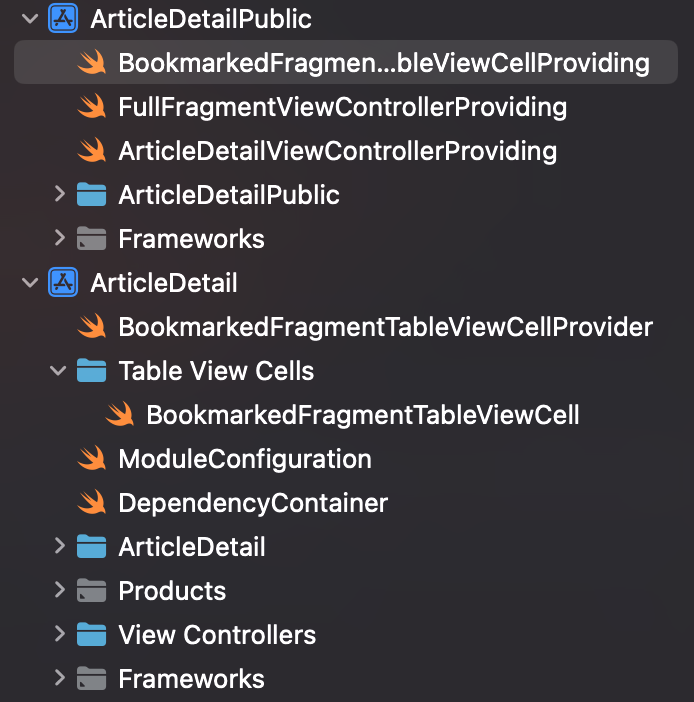
<p><img src="/assets/images/Screenshot_2025-09-29_at_19.17.37.png" alt="Screenshot 2025-09-29 at 19.17.37.png" /></p>

<p>The screenshot above shows an example of these mechanics in action. The private module <code class="language-plaintext highlighter-rouge">ArticleDetail</code> contains the concrete implementations, while the corresponding <code class="language-plaintext highlighter-rouge">ArticleDetailPublic</code> module defines the protocols that other modules depend on. What’s particularly interesting is the <code class="language-plaintext highlighter-rouge">BookmarkedFragmentTableViewCell</code> example. The file in the “Table View Cells” directory contains the full implementation of a custom <code class="language-plaintext highlighter-rouge">UITableViewCell</code>, while <code class="language-plaintext highlighter-rouge">BookmarkedFragmentTableViewCellProvider</code> acts as a factory that handles cell registration with the table view. The provider conforms to <code class="language-plaintext highlighter-rouge">BookmarkedFragmentTableViewCellProviding</code> - a protocol defined in the public module. Other modules that need this cell type depend only on the <code class="language-plaintext highlighter-rouge">BookmarkedFragmentTableViewCellProviding</code> protocol, not the concrete provider or cell implementation. Note the flexibility of this approach: you can modify the cell implementation, swap out the provider, or even provide entirely different implementations (as long as they conform to the protocol, dependent modules remain unaffected). The consuming code is completely decoupled from implementation details.</p>

<p>At this point you might be wondering: “<em>Ok, I get the protocol/provider pattern, but how do modules actually get these providers? How does a module obtain an instance of something conforming to</em> <code class="language-plaintext highlighter-rouge">BookmarkedFragmentTableViewCellProviding</code>?” This is where dependency injection comes in. Being completely honest, this pattern was so confusing to me in the beginning that I just didn’t know where to start, because the questions in my head kept piling up with no answers.</p>

<h3 id="registration-resolution-usage">Registration, Resolution, Usage</h3>

<p>So, let’s clear up the confusion from the paragraph before. Starting with “<em>where do I register things so that other modules can use them?</em>” You probably noticed in the screenshot that the <code class="language-plaintext highlighter-rouge">ArticleDetail</code> module has a <code class="language-plaintext highlighter-rouge">ModuleConfiguration.swift</code> file. Each private module contains this configuration file, which serves two purposes: first, it registers the module’s implementations (the concrete types that fulfill the protocols defined in its public module), making them available to other modules that need them. Second, it resolves and stores the dependencies this module needs from other modules. Think of it as a two-way contract: “<em>Hey, here’s what I bring to the table (i.e., provide to the app), and here’s what I need from other modules to function.</em>” Here’s what this looks like in the <code class="language-plaintext highlighter-rouge">ArticleDetail</code> module:</p>

<div class="language-swift highlighter-rouge"><div class="highlight"><pre class="highlight"><code><span class="kd">public</span> <span class="kd">final</span> <span class="kd">class</span> <span class="kt">ModuleConfiguration</span><span class="p">:</span> <span class="kt">ModuleConfiguring</span> <span class="p">{</span>
    <span class="kd">public</span> <span class="kd">static</span> <span class="kd">func</span> <span class="nf">registerImplementations</span><span class="p">(</span><span class="k">in</span> <span class="nv">container</span><span class="p">:</span> <span class="n">any</span> <span class="kt">ModuleKit</span><span class="o">.</span><span class="kt">DependencyRegistering</span><span class="p">)</span> <span class="p">{</span>
        <span class="n">container</span><span class="o">.</span><span class="nf">register</span><span class="p">(</span><span class="kt">ArticleDetailViewControllerProviding</span><span class="o">.</span><span class="k">self</span><span class="p">)</span> <span class="p">{</span>
            <span class="k">return</span> <span class="kt">ArticleWebViewControllerBuilder</span><span class="p">()</span>
        <span class="p">}</span>

        <span class="n">container</span><span class="o">.</span><span class="nf">register</span><span class="p">(</span><span class="kt">FullFragmentViewControllerProviding</span><span class="o">.</span><span class="k">self</span><span class="p">)</span> <span class="p">{</span>
            <span class="k">return</span> <span class="kt">FullFragmentViewControllerBuilder</span><span class="p">()</span>
        <span class="p">}</span>

        <span class="n">container</span><span class="o">.</span><span class="nf">register</span><span class="p">(</span><span class="kt">BookmarkedFragmentTableViewCellProviding</span><span class="o">.</span><span class="k">self</span><span class="p">)</span> <span class="p">{</span>
            <span class="k">return</span> <span class="kt">BookmarkedFragmentTableViewCellProvider</span><span class="p">()</span>
        <span class="p">}</span>
    <span class="p">}</span>
    <span class="c1">// ...</span>
<span class="p">}</span>
</code></pre></div></div>

<p><code class="language-plaintext highlighter-rouge">ArticleDetail</code> ”gives” these three building blocks to the app (including our table view cell discussed before).</p>

<aside>
  <p>💡 <strong>Note:</strong> In the context of dependency <em>registration</em> and <em>resolution</em>, I use the word “app” as a substitute for the word “modules”.</p>
</aside>

<p><code class="language-plaintext highlighter-rouge">ArticleDetail</code> needs a provider that conforms to <code class="language-plaintext highlighter-rouge">CommentsViewControllerProviding</code> protocol:</p>

<div class="language-swift highlighter-rouge"><div class="highlight"><pre class="highlight"><code><span class="c1">// *Continuing in ModuleConfiguration.swift*</span>
<span class="kd">public</span> <span class="kd">static</span> <span class="kd">func</span> <span class="nf">resolveDependencies</span><span class="p">(</span><span class="n">with</span> <span class="nv">resolver</span><span class="p">:</span> <span class="n">any</span> <span class="kt">ModuleKit</span><span class="o">.</span><span class="kt">DependencyResolving</span><span class="p">)</span> <span class="p">{</span>
    <span class="k">guard</span> <span class="k">let</span> <span class="nv">commentsViewControllerProvider</span> <span class="o">=</span> <span class="n">resolver</span><span class="o">.</span><span class="nf">resolve</span><span class="p">(</span><span class="nv">type</span><span class="p">:</span> <span class="kt">CommentsViewControllerProviding</span><span class="o">.</span><span class="k">self</span><span class="p">)</span> <span class="k">else</span> <span class="p">{</span>
        <span class="nf">assertionFailure</span><span class="p">(</span><span class="s">"No Comments View Controller Provider found!"</span><span class="p">)</span>
        <span class="k">return</span>
    <span class="p">}</span>

    <span class="kt">DependencyContainer</span><span class="o">.</span><span class="k">default</span><span class="o">.</span><span class="n">commentsViewControllerProviding</span> <span class="o">=</span> <span class="n">commentsViewControllerProvider</span>
<span class="p">}</span>
</code></pre></div></div>

<p>The <code class="language-plaintext highlighter-rouge">resolveDependencies</code> method is where the module declares its external dependencies, basically saying “<em>I need these components from other modules to function properly</em>.” These resolved dependencies are stored in the module’s <code class="language-plaintext highlighter-rouge">DependencyContainer</code>, which acts as an internal registry that components within the module can access. Here’s the <code class="language-plaintext highlighter-rouge">DependencyContainer</code> for <code class="language-plaintext highlighter-rouge">ArticleDetail</code>:</p>

<div class="language-swift highlighter-rouge"><div class="highlight"><pre class="highlight"><code><span class="kd">import</span> <span class="kt">Foundation</span>
<span class="kd">import</span> <span class="kt">CoreKit</span>
<span class="kd">import</span> <span class="kt">DiscussionPublic</span> <span class="c1">// *We need to import that module to obtain the* </span>
                        <span class="c1">// `*CommentsViewControllerProviding` protocol*</span>

<span class="kd">final</span> <span class="kd">class</span> <span class="kt">DependencyContainer</span> <span class="p">{</span>
    <span class="kd">static</span> <span class="kd">let</span> <span class="p">`</span><span class="nv">default</span><span class="p">`</span> <span class="o">=</span> <span class="kt">DependencyContainer</span><span class="p">()</span>
    <span class="k">var</span> <span class="nv">commentsViewControllerProviding</span><span class="p">:</span> <span class="kt">CommentsViewControllerProviding</span><span class="o">!</span>
<span class="p">}</span>
</code></pre></div></div>

<p>The container is a simple singleton that holds references to the external dependencies this module needs. When <code class="language-plaintext highlighter-rouge">resolveDependencies</code> runs during app initialization, it populates these properties, making them available throughout the module’s internal implementation.</p>

<p>Using the component is very simple. In your implementation code for <code class="language-plaintext highlighter-rouge">ArticleDetail</code> you’d simply call <code class="language-plaintext highlighter-rouge">DependencyContainer.default.commentsViewControllerProviding</code> whenever you needed to use that element, and then you’d call
the method that the conforming type must implement to use the actual implementation. Here’s an example of that:</p>

<div class="language-swift highlighter-rouge"><div class="highlight"><pre class="highlight"><code><span class="kd">@objc</span> <span class="kd">private</span> <span class="kd">func</span> <span class="nf">presentComments</span><span class="p">()</span> <span class="p">{</span>
    <span class="k">let</span> <span class="nv">commentsViewControllerProviding</span> <span class="o">=</span> <span class="kt">DependencyContainer</span><span class="o">.</span><span class="k">default</span><span class="o">.</span><span class="n">commentsViewControllerProviding</span>
    <span class="k">let</span> <span class="nv">commentsViewController</span> <span class="o">=</span> <span class="n">commentsViewControllerProviding</span><span class="p">?</span><span class="o">.</span><span class="nf">createCommentsViewController</span><span class="p">(</span><span class="nv">article</span><span class="p">:</span> <span class="n">article</span><span class="p">)</span>
    
    <span class="c1">// *rest of the code*</span>
<span class="p">}</span>
</code></pre></div></div>

<p><code class="language-plaintext highlighter-rouge">commentsViewControllerProviding</code> is of type <code class="language-plaintext highlighter-rouge">CommentsViewControllerProviding</code>, so we cannot plug this in straight away in our code, as that’s just a protocol. But, we do know that <code class="language-plaintext highlighter-rouge">CommentsViewControllerProviding</code> has a method that any conforming type must implement, and returns a <code class="language-plaintext highlighter-rouge">UIViewController</code> that can then be used to display it in the app:</p>

<div class="language-swift highlighter-rouge"><div class="highlight"><pre class="highlight"><code><span class="kd">public</span> <span class="kd">protocol</span> <span class="kt">CommentsViewControllerProviding</span> <span class="p">{</span>
    <span class="kd">func</span> <span class="nf">createCommentsViewController</span><span class="p">(</span><span class="nv">article</span><span class="p">:</span> <span class="kt">Article</span><span class="p">)</span> <span class="o">-&gt;</span> <span class="kt">UIViewController</span>
<span class="p">}</span>
</code></pre></div></div>

<p>This example demonstrates how the public/private module pattern with dependency injection creates highly decoupled code. Yes, there’s an initial investment in setting up the architecture and thinking through module boundaries, but the payoff is substantial: swapping implementations or modifying features no longer requires cascading changes across modules that depend on them. You change the implementation, and as long as it conforms to the protocol, everything continues to work.</p>

<p>I briefly mentioned Bazel in this section, but so far it is nowhere to be found. Let’s introduce it and, most importantly, explain how it ties to my incoherent ramblings about modularity. After all, Bazel was built for exactly these kinds of problems: making dependencies explicit and enforceable.</p>

<h3 id="enter-bazel">Enter Bazel</h3>

<p>Before we connect the dots, let me shortly explain what Bazel is (though, keep in mind that it’s such an incredibly complex and extensive tool, that I won’t even dare saying that I understand even 1/100th of it.) Bazel is an open-source build system, originally designed to handle massive codebases. Google is known for having a massive “<em>monolithic repository</em>” (monorepo), so they had to come up with a tool that could handle managing billions of lines of code (and growing) that span across multiple platforms and hundreds of programming languages. At its core, Bazel treats a project as a <strong>graph of explicit targets</strong>. Each target is required to declare its sources and dependencies in a <code class="language-plaintext highlighter-rouge">BUILD.bazel</code> file. It’s up to you, as a programmer, to define those according to the needs of your target/module (once we get to the nitty gritty details, I will present snippets of those files that I created for Hacksy.) The dependency graph is known and checked at build time and it prevents “hidden” or accidental coupling. And I can tell you from my experience that Bazel is ruthless at enforcing strict module boundaries.</p>

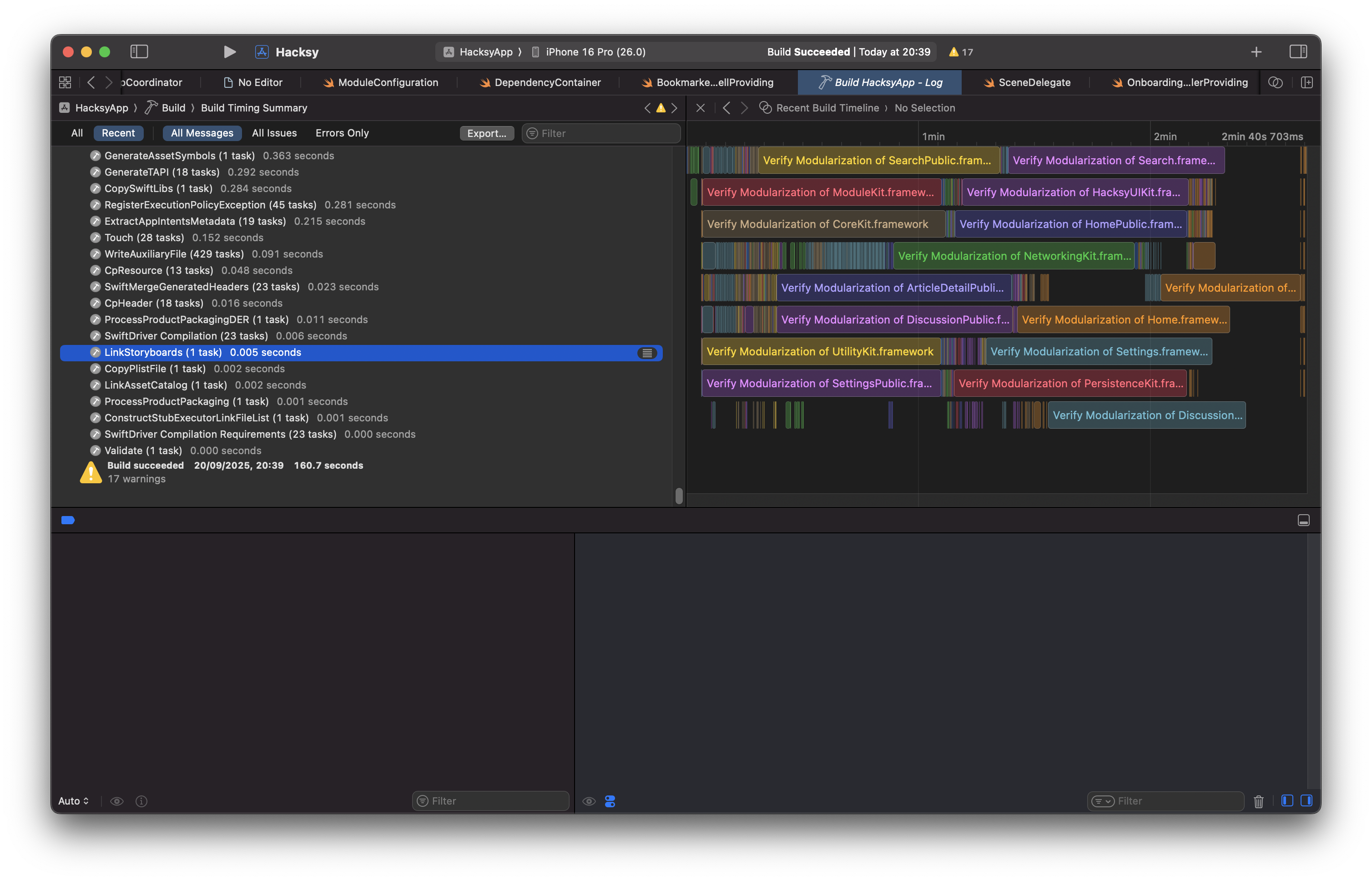
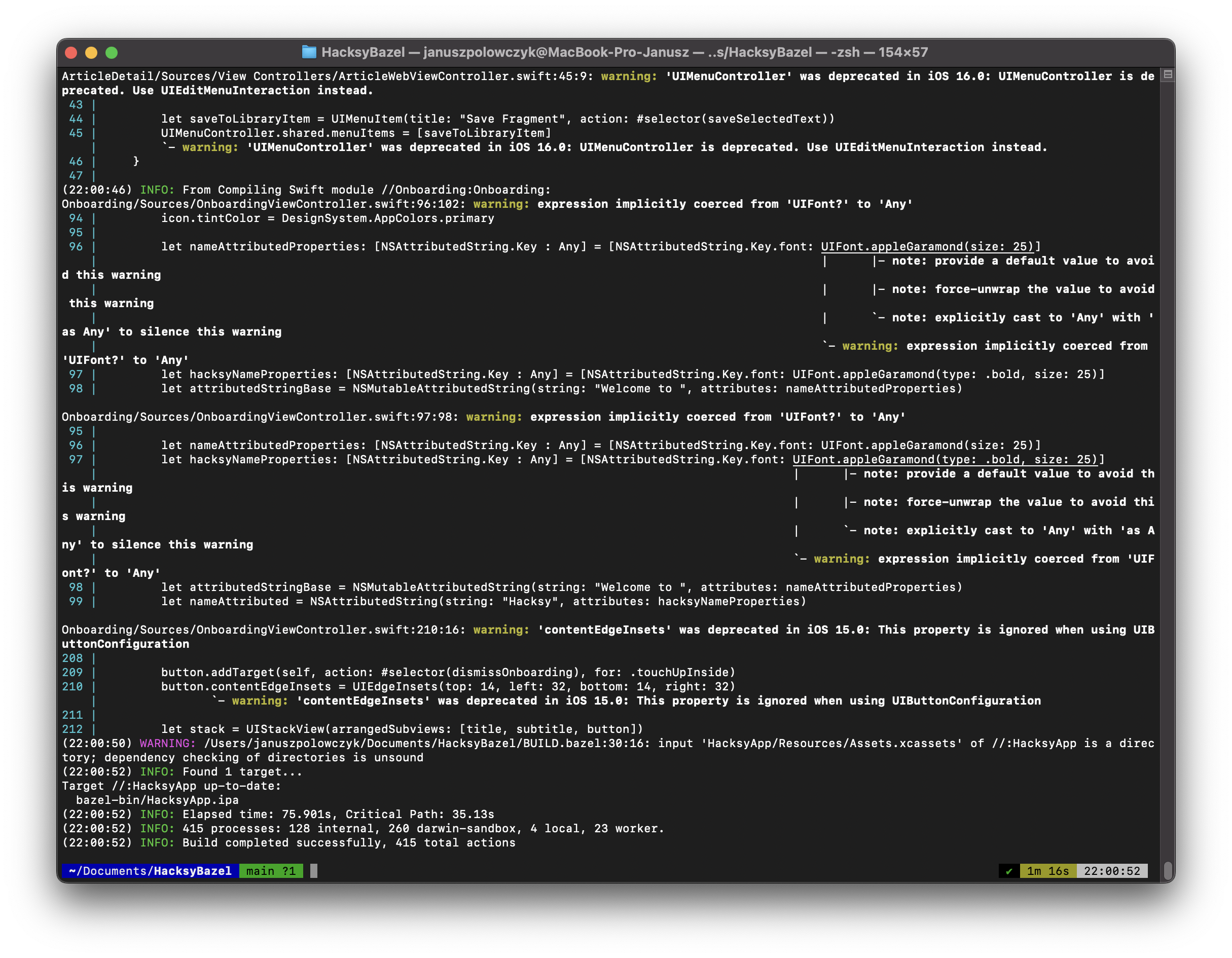
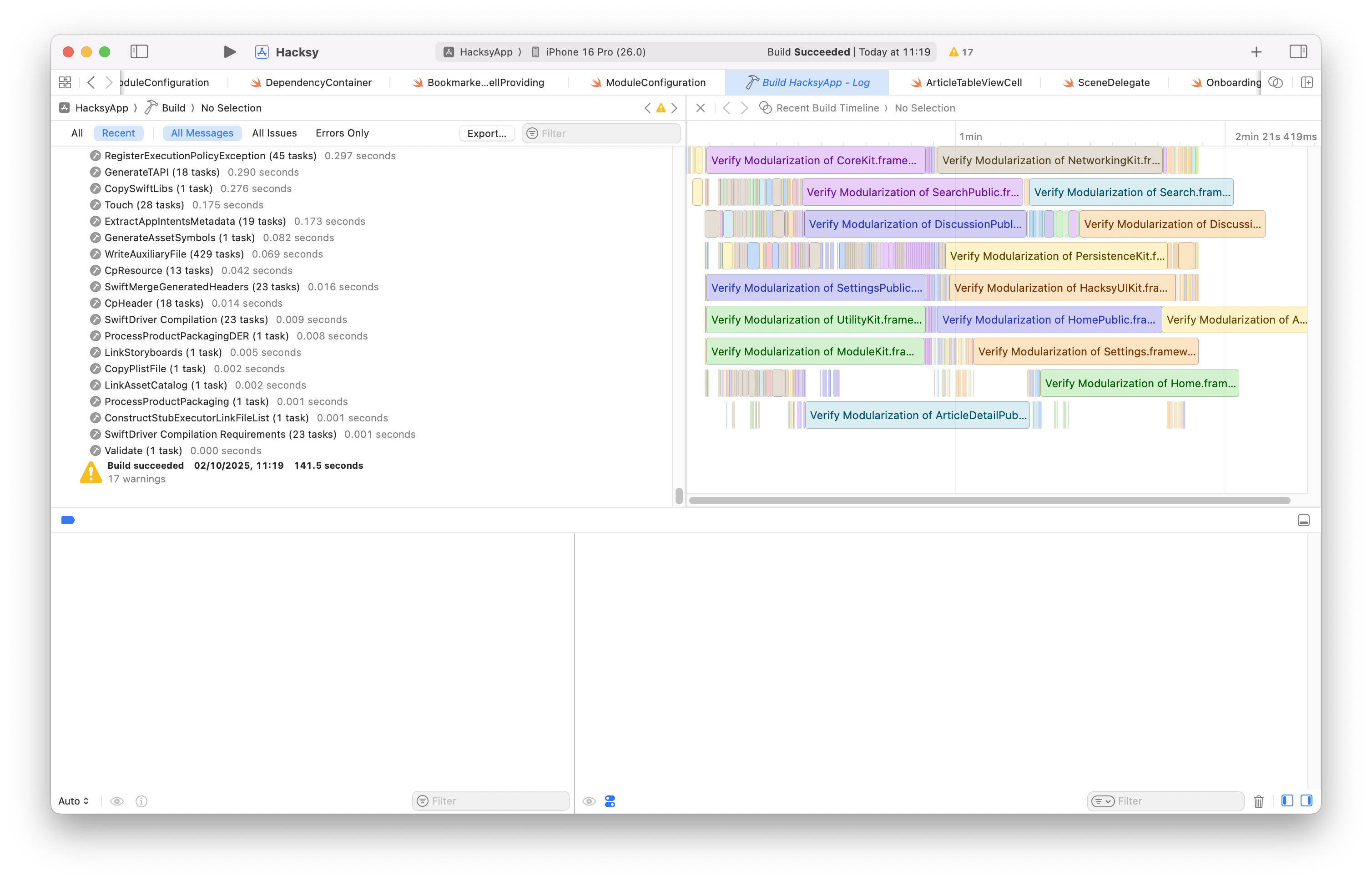
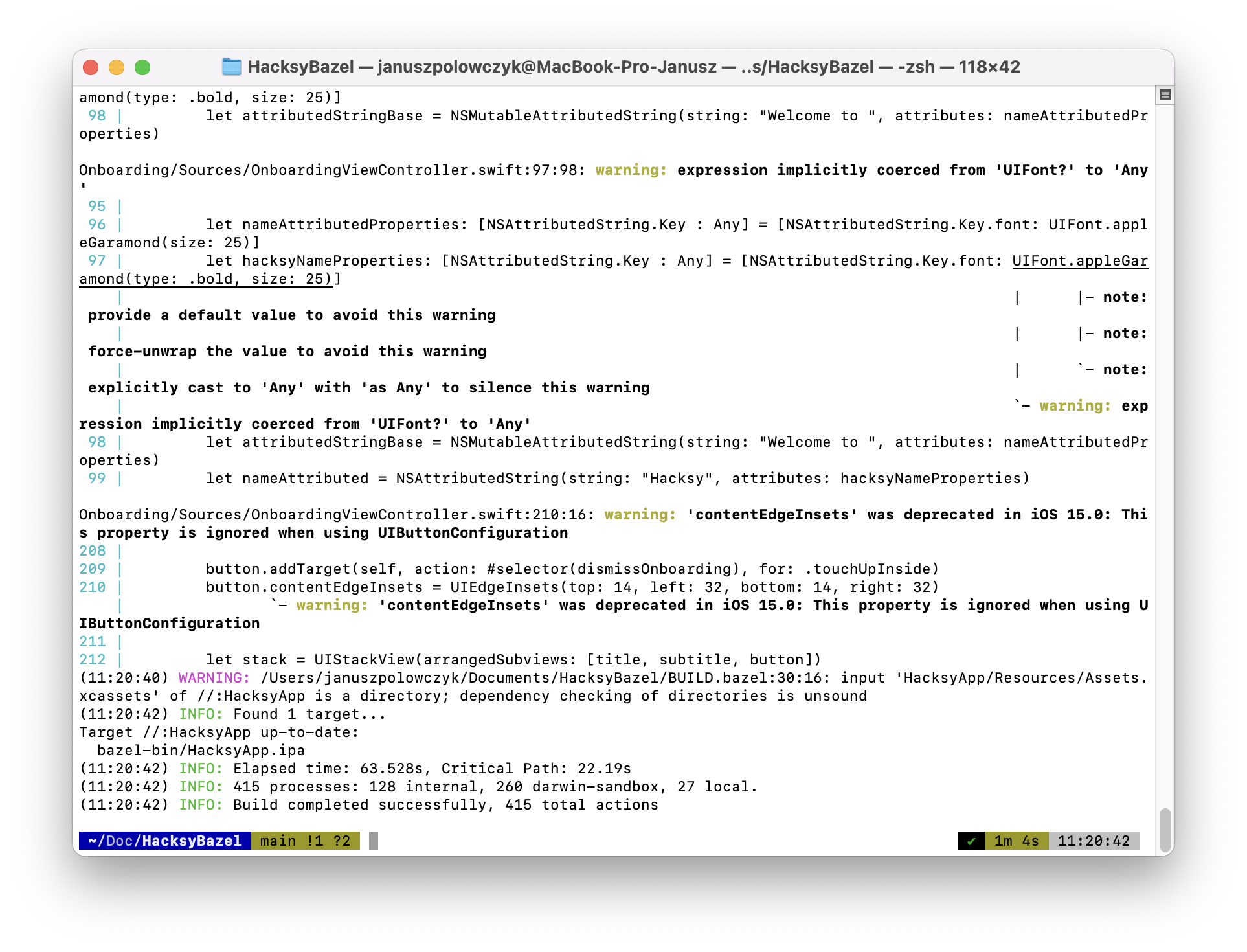
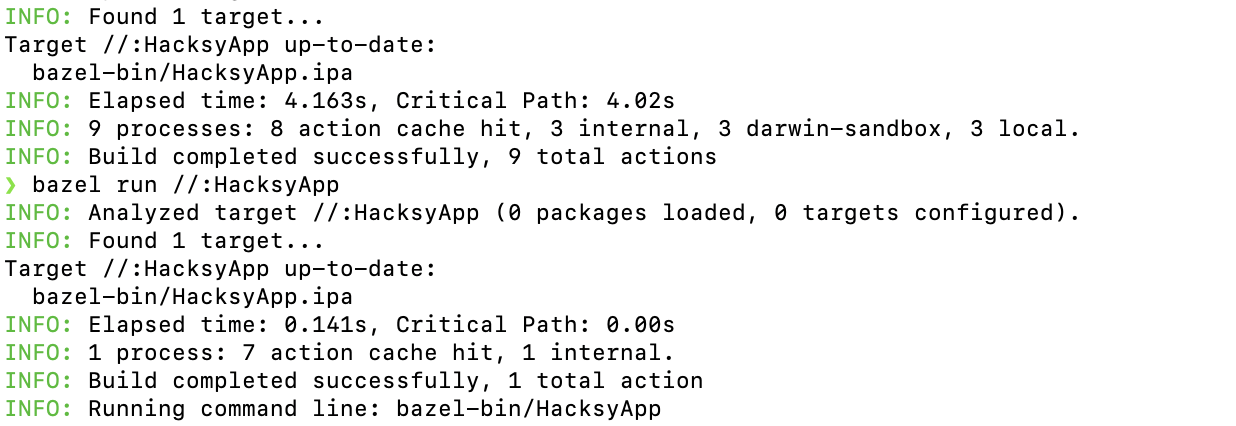
<p>Bazel’s dependency graph goes hand-in-hand with one of it’s most important features: <strong>incremental builds</strong>. Basically, unchanged targets in your app are never rebuilt. Content-addressable caching mechanism ensures that only the module that changed is rebuilt without the overhead of rebuilding other modules. So, coming back to an earlier example of <code class="language-plaintext highlighter-rouge">ArticleDetail</code>: if I make a change in one of the implementations, Bazel only considers these changes when rebuilding the whole app. It’s an incredibly impressive system and later I will provide screenshots of build times for both the Xcode and Bazel. Let me just preface that by saying I cut the build times in half by using Bazel and we’re talking about a small-to-moderately sized application here, not some huge monorepo with thousands of modules.</p>

<p>Back to business. <em>Why would I even do such thing?</em> Being completely honest, there was no need for my app to implement such complex system. Literally zero reason. But my curiosity, stubbornness, and defiance to give up when not understanding something was just stronger. See, with my first encounter with Bazel and all of the things that I am writing about here, I failed. I just didn’t understand how to navigate this complex thing, what goes where, and why do I have to fight the tool rather than contributing to building the app. What also did not help was the fact that build systems are notoriously difficult to learn as they stand at an intersection of many subdomains in computer science (Systems Programming, Graph Theory, Operating Systems) and there is a lot of <em>tacit knowledge</em> required to implement them correctly. Funny how harnessing complexity requires introducing even more complexity, but let’s leave the philosophical discussions aside.</p>

<p>The fact that we don’t have to wrestle so much with the aforementioned problems when using Xcode, is a result of brilliant people at Apple putting effort to hide that complexity from iOS developers by making a lot of implicit assumptions. To give you an example: When firing up your project, you don’t have to think about adding <code class="language-plaintext highlighter-rouge">UIKit</code> or any other Apple-provided framework explicitly. It’s just there, waiting for you to write <code class="language-plaintext highlighter-rouge">import UIKit</code>. Whereas when using a build system like Bazel (or Meta’s Buck2), you are responsible for adding those frameworks yourself to the <code class="language-plaintext highlighter-rouge">BUILD</code> file. What you have to do is essentially rewire your thinking a bit, because you’re not managing files anymore, but a distributed computation graph. Something that’s rarely required of an iOS developer.</p>

<h2 id="how-i-migrated-hacksy-to-bazel">How I Migrated Hacksy to Bazel</h2>

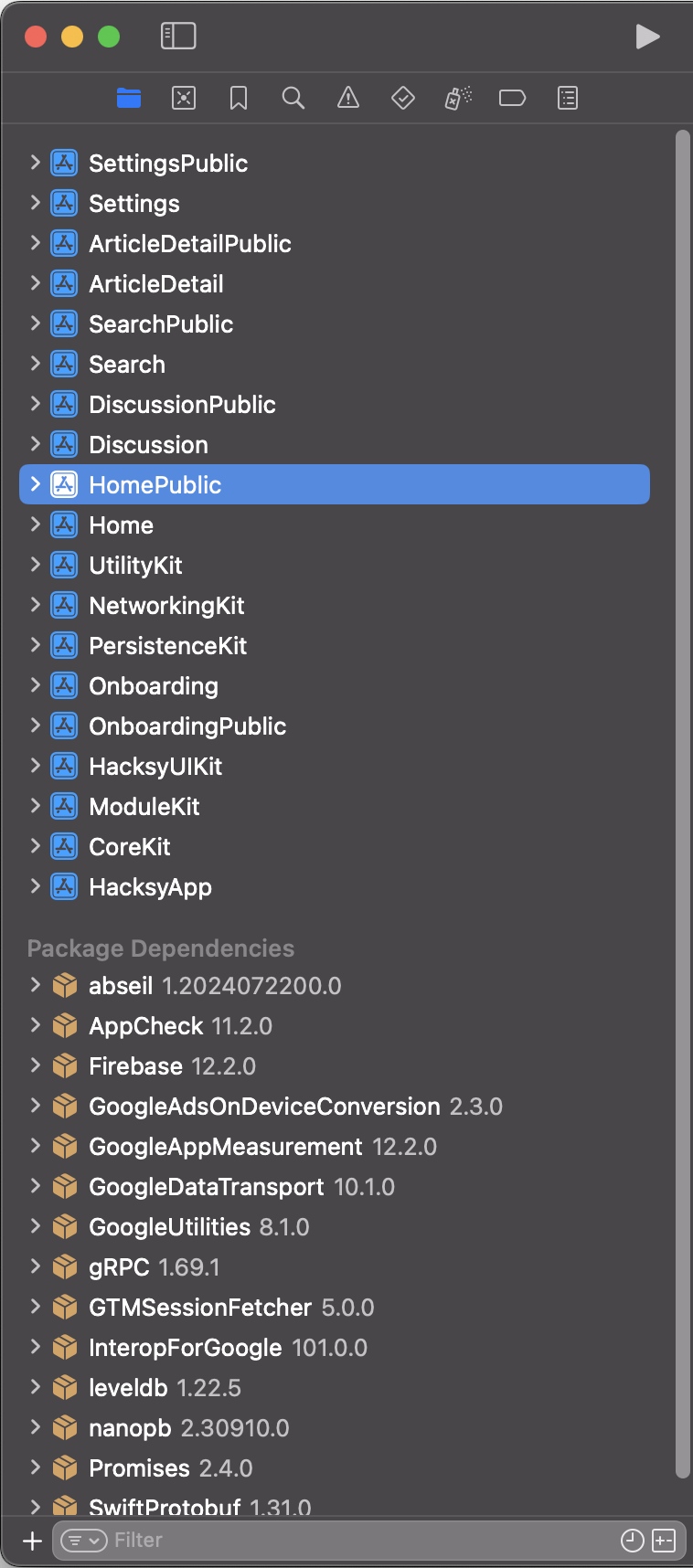
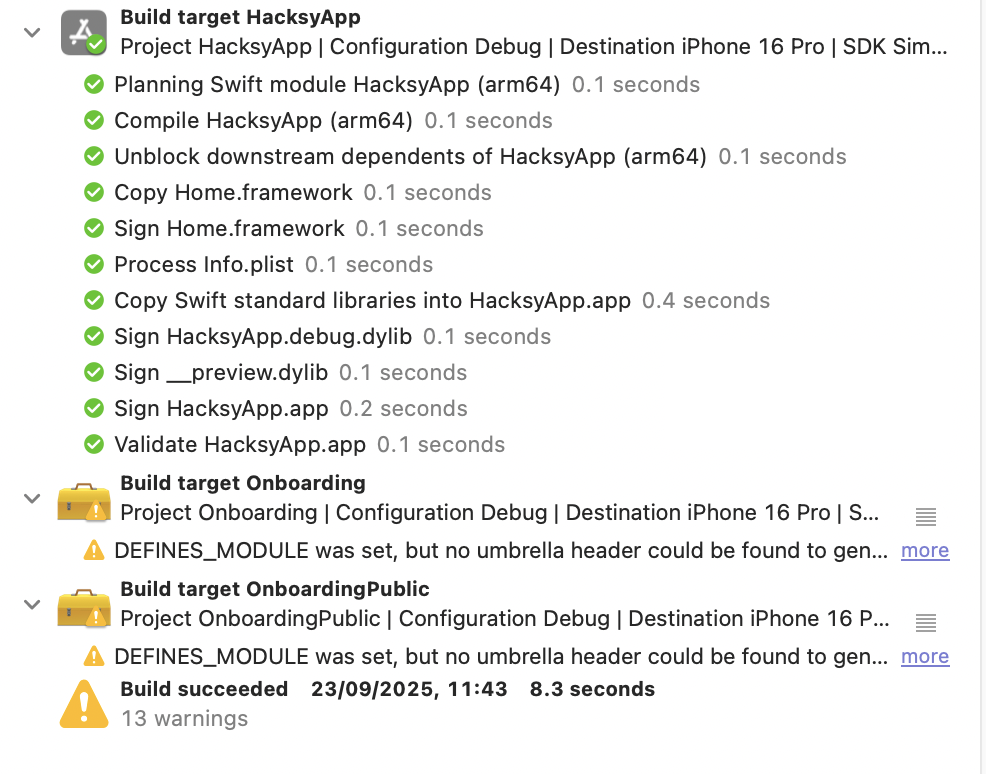
<p>With the modular architecture in place, I decided that it was now time to incorporate Bazel into the project. I noticed that the build times of my app were getting rather long, around 3 minutes. Not the end of the world, but I knew that it could be improved. This is how Hacksy workspace looked like before I decided to migrate the project to Bazel:</p>

<p><img src="/assets/images/Screenshot_2025-09-22_at_22.58.37.png" alt="Screenshot 2025-09-22 at 22.58.37.png" /></p>

<p>Everything is neatly compartmentalized into a separate framework that implements a given feature. As you can see, app features (screens) are divided into public/private modules, whereas the general purpose modules “stand on their own”, meaning they don’t have a corresponding public module. This presents itself nicely for a smooth migration to Bazel, correct? Unfortunately no, for many reasons.</p>

<h3 id="reason-1---incorrect-directory-structure"><u>Reason #1</u> - Incorrect Directory Structure</h3>

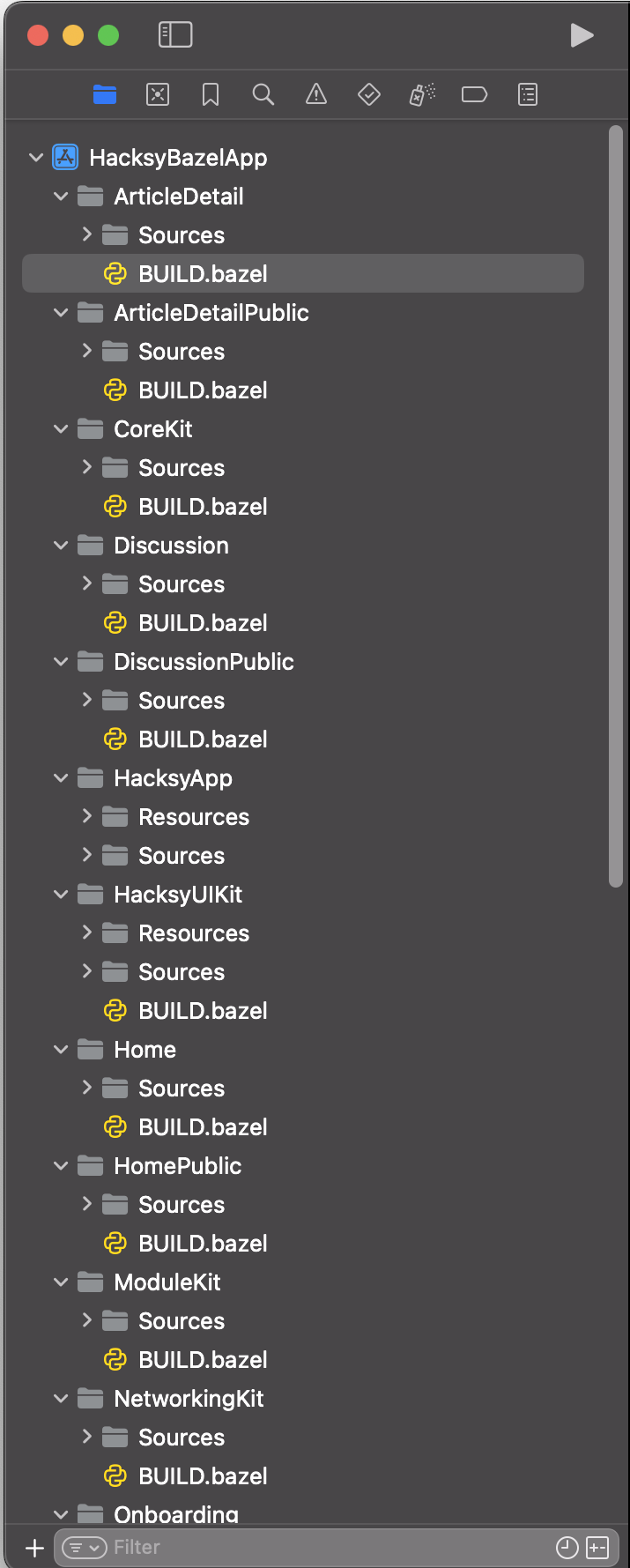
<p>When you scroll back to the screenshot that I attached in the section about modularity, you’ll see that the files seem to be neatly organized into folders, such as “View Controllers”, or “Table View Cells”. While there is nothing inherently wrong with structuring your projects like this; the approach <em>does not</em> <em>lend itself nicely for Bazel.</em> It can be done this way, but it’s much more painful and error-prone. When you take a look at Bazel’s GitHub repository and the <a href="https://github.com/bazelbuild/rules_apple/tree/master/examples">examples</a> that are there, you’ll see that all of those projects are neatly divided into “Sources” and “Resources” directories. And for a good reason. It enforces a clear structure for a module and you’re less likely to make an error in a <code class="language-plaintext highlighter-rouge">BUILD</code> file for a target. Inside the “Sources” directory, you can put any folders containing <code class="language-plaintext highlighter-rouge">.swift</code> files as you like. What matters is that there is a single directory with those files—not multiple—as was the case with the Hacksy codebase I displayed above. Here’s the correct structure in the re-architected version of Hacksy:</p>

<div class="language-bash highlighter-rouge"><div class="highlight"><pre class="highlight"><code>├── Search
│   ├── BUILD.bazel
│   └── Sources
│       ├── CommentSearchResultCellProvider.swift
│       ├── DependencyContainer.swift
│       ├── ModuleConfiguration.swift
│       ├── StorySearchResultCellProvider.swift
│       ├── Table View Cells
│       │   ├── CommentSearchResultCell.swift
│       │   └── StorySearchResultCell.swift
│       └── View Controllers
│           └── SearchViewController.swift
├── SearchPublic
│   ├── BUILD.bazel
│   └── Sources
│       ├── CommentSearchResultCellProviding.swift
│       ├── SearchResultCellProviding.swift
│       └── SearchViewControllerProviding.swift
</code></pre></div></div>

<h3 id="reason-2---incorrect-top-level-target-directory-structure"><u>Reason #2</u> - Incorrect Top Level Target Directory Structure</h3>

<p>Looking once again at the screenshot with the modules, it’s not clear (to Bazel) what is the main target that combines all of the modules together. A big mistake that I made, was to assume that I just need to add the <code class="language-plaintext highlighter-rouge">BUILD</code>  and <code class="language-plaintext highlighter-rouge">MODULE</code> files to the root directory of Hacksy, and Bazel will figure out what is what. As is usually the case, reality brutally verified that claim and I was stuck not knowing how to proceed forward. Identically to reason #1, you have to provide a similar directory structure to the top level target. Only then Bazel will know how to proceed with your project. The way Hacksy was structured before, there was no clear definition of what the main target was. So, following from the previous example, here’s the structure for the HacksyApp top level target:</p>

<div class="language-bash highlighter-rouge"><div class="highlight"><pre class="highlight"><code>HacksyApp
├── Resources
│   ├── Assets.xcassets
│   │   ├── AccentColor.colorset
│   │   │   └── Contents.json
│   │   ├── AppBackground.colorset
│   │   │   └── Contents.json
│   │   ├── AppIcon.appiconset
│   │   │   └── Contents.json
│   │   ├── BrandPrimary.colorset
│   │   │   └── Contents.json
│   │   ├── Contents.json
│   │   ├── HackyIcon.imageset
│   │   │   ├── Contents.json
│   │   │   └── HackyIcon2.png
│   │   ├── HackyIconGlow.imageset
│   │   │   ├── Contents.json
│   │   │   └── HackyIconShadow.png
│   │   ├── HackyLogo.imageset
│   │   │   ├── Contents.json
│   │   │   └── HackyLogo2.png
│   │   └── SecondaryBackground.colorset
│   │       └── Contents.json
│   ├── Base.lproj
│   │   ├── LaunchScreen.storyboard
│   │   └── Main.storyboard
│   ├── GoogleService-Info.plist
│   └── Info.plist
└── Sources
    ├── AppDelegate.swift
    ├── HacksyAppCoordinator.swift
    └── SceneDelegate.swift
</code></pre></div></div>

<h3 id="reason-3---spm-and-firebase"><u>Reason #3</u> - SPM and Firebase</h3>

<p>Now we’re coming to one of the biggest challenges that I faced when moving Hacksy to Bazel. I was looking for a solution for this for a week, experimented left, right, and center, but it was just not working out no matter what I did. It got to the point where I left this project completely dejected and started to look at alternatives that maybe were easier to implement, but those alternatives were just as frustrating, so I left it and came back to it after a moment.</p>

<p>The issue was that most of the solutions to having external dependencies (like Firebase) being added through Bazel were either relying on Cocoapods (which are unfortunately getting sunsetted) or the old ways of creating Bazel projects through <code class="language-plaintext highlighter-rouge">WORKSPACE</code> and not <code class="language-plaintext highlighter-rouge">bzlmod</code>. I did a lot of brainstorming with Claude about my approach and I got the following answer when I faced the issue:</p>

<blockquote>
  <p><em>Given Firebase’s current state with SPM and the FirebaseCoreExternal changes, you might want to question whether the build time improvements are worth the engineering overhead right now.</em></p>

</blockquote>

<p>The <code class="language-plaintext highlighter-rouge">FirebaseCoreExternal</code> changes mentioned by Claude were a result of one of its suggestions to basically download the <a href="https://github.com/firebase/firebase-ios-sdk/releases">official release</a> of Firebase and manually add the necessary dependencies to my project. While the suggestion was not completely wrong as it is one way to solve the problem, it fell short for a simple reason: due to the changes made in Firebase SDK, the Core module is not a part of the release that you download. There is <code class="language-plaintext highlighter-rouge">FirebaseCoreExtension</code>, but it’s not what I needed. If you are curious how the structure of unpacked Firebase release looks like, it’s this:</p>

<p><img src="/assets/images/Screenshot_2025-10-01_at_20.56.14.png" alt="Screenshot 2025-10-01 at 20.56.14.png" /></p>

<p>Although Claude was trying to veer me into a different direction and provided some solid arguments to change course, I’m always skeptical whenever AI produces an answer. Also, I just couldn’t believe that there is no way to integrate SPM (the de-facto current standard of bringing in packages in iOS projects) using one of the biggest build systems. Finally, after researching a bit more, I found <code class="language-plaintext highlighter-rouge">rules_swift_package_manager</code> <a href="https://github.com/cgrindel/rules_swift_package_manager">(link to GitHub)</a>, a Bazel dependency that allows you to use SPM with Bazel. But, I encountered some problems with it. Not with the tool itself, but rather how to use it correctly. Given that I am dealing with a package manager, <em>do I resolve the dependencies with SPM itself, or does Bazel take over the whole process</em>? Initially, I just assumed that I simply add the <code class="language-plaintext highlighter-rouge">rules_swift_package_manager</code> dependency, pass the packages I want in my project, enter <code class="language-plaintext highlighter-rouge">bazel run</code> and I am good to go. That was of course a totally failed attempt. Firebase was fetched, but I couldn’t import it anywhere, Xcode was complaining that there is no such module as <code class="language-plaintext highlighter-rouge">FirebaseCore</code>, or <code class="language-plaintext highlighter-rouge">FirebaseDatabase</code> for that matter.</p>

<h3 id="making-spm-and-bazel-cooperate">Making SPM and Bazel cooperate</h3>

<p>The solution to this issue is to have SPM and Bazel work in tandem. Here’s how you do it: First, you declare a <code class="language-plaintext highlighter-rouge">Package.swift</code> at the <strong>root level</strong> of your project with the required dependencies. For me, the <code class="language-plaintext highlighter-rouge">Package.swift</code> looks like this:</p>

<div class="language-swift highlighter-rouge"><div class="highlight"><pre class="highlight"><code><span class="c1">// swift-tools-version: 5.9</span>
<span class="kd">import</span> <span class="kt">PackageDescription</span>

<span class="k">let</span> <span class="nv">package</span> <span class="o">=</span> <span class="kt">Package</span><span class="p">(</span>
    <span class="nv">name</span><span class="p">:</span> <span class="s">"hacksybazel"</span><span class="p">,</span> <span class="c1">// &lt;- this has to match the name of the module in MODULE.bazel</span>
    <span class="nv">dependencies</span><span class="p">:</span> <span class="p">[</span>
        <span class="o">.</span><span class="nf">package</span><span class="p">(</span>
            <span class="nv">url</span><span class="p">:</span> <span class="s">"https://github.com/firebase/firebase-ios-sdk.git"</span><span class="p">,</span>
            <span class="nv">exact</span><span class="p">:</span> <span class="s">"12.3.0"</span>
        <span class="p">)</span>
    <span class="p">]</span>
<span class="p">)</span>
</code></pre></div></div>

<p>Nothing out of the ordinary here. Next, you run <code class="language-plaintext highlighter-rouge">swift package resolve</code>, this creates a <code class="language-plaintext highlighter-rouge">Package.resolved</code> file. Now, these next steps are critical for the whole assembly to work. In your <code class="language-plaintext highlighter-rouge">MODULE.bazel</code> (declared at the root of your project), you add the dependency on <code class="language-plaintext highlighter-rouge">rules_swift_package_manager</code> and do the following:</p>

<div class="language-python highlighter-rouge"><div class="highlight"><pre class="highlight"><code><span class="n">module</span><span class="p">(</span>
    <span class="n">name</span> <span class="o">=</span> <span class="s">"hacksybazel"</span><span class="p">,</span>
    <span class="n">version</span> <span class="o">=</span> <span class="s">"1.0.0"</span><span class="p">,</span>
<span class="p">)</span>

<span class="n">bazel_dep</span><span class="p">(</span><span class="n">name</span> <span class="o">=</span> <span class="s">"apple_support"</span><span class="p">,</span> <span class="n">version</span> <span class="o">=</span> <span class="s">"1.22.1"</span><span class="p">)</span>
<span class="n">bazel_dep</span><span class="p">(</span><span class="n">name</span> <span class="o">=</span> <span class="s">"rules_apple"</span><span class="p">,</span> <span class="n">version</span> <span class="o">=</span> <span class="s">"4.0.1"</span><span class="p">)</span>
<span class="n">bazel_dep</span><span class="p">(</span><span class="n">name</span> <span class="o">=</span> <span class="s">"rules_swift"</span><span class="p">,</span> <span class="n">version</span> <span class="o">=</span> <span class="s">"3.0.2"</span><span class="p">)</span>
<span class="n">bazel_dep</span><span class="p">(</span><span class="n">name</span> <span class="o">=</span> <span class="s">"rules_xcodeproj"</span><span class="p">,</span> <span class="n">version</span> <span class="o">=</span> <span class="s">"3.0.0"</span><span class="p">)</span>
<span class="n">bazel_dep</span><span class="p">(</span><span class="n">name</span> <span class="o">=</span> <span class="s">"rules_swift_package_manager"</span><span class="p">,</span> <span class="n">version</span> <span class="o">=</span> <span class="s">"1.6.0"</span><span class="p">)</span>

<span class="n">swift_deps</span> <span class="o">=</span> <span class="n">use_extension</span><span class="p">(</span>
    <span class="s">"@rules_swift_package_manager//:extensions.bzl"</span><span class="p">,</span>
    <span class="s">"swift_deps"</span><span class="p">,</span>
<span class="p">)</span>
<span class="n">swift_deps</span><span class="p">.</span><span class="n">from_package</span><span class="p">(</span>
    <span class="n">resolved</span> <span class="o">=</span> <span class="s">"//:Package.resolved"</span><span class="p">,</span>
    <span class="n">swift</span> <span class="o">=</span> <span class="s">"//:Package.swift"</span><span class="p">,</span>
<span class="p">)</span>
<span class="n">use_repo</span><span class="p">(</span>
    <span class="n">swift_deps</span><span class="p">,</span>
    <span class="s">"swift_package"</span><span class="p">,</span>
    <span class="s">"swiftpkg_firebase_ios_sdk"</span><span class="p">,</span>
<span class="p">)</span>
</code></pre></div></div>

<p>The important bits are the <code class="language-plaintext highlighter-rouge">.from_package(...)</code> and <code class="language-plaintext highlighter-rouge">use_repo(...)</code> calls. You pass both the resolved package file and the <code class="language-plaintext highlighter-rouge">.swift</code> file to give Bazel the info on what to fetch. What is really important in the <code class="language-plaintext highlighter-rouge">use_repo(...)</code> call is this line <code class="language-plaintext highlighter-rouge">swiftpkg_firebase_ios_sdk</code>. It is the alias (for a lack of a better word) that you use to embed Firebase as a dependency either in your whole project, or just one module. The official repository for <code class="language-plaintext highlighter-rouge">rules_swift_package_manager</code> states the following:</p>

<blockquote>
  <p><em>The name of the Bazel external repository for a Swift package is <code class="language-plaintext highlighter-rouge">swiftpkg_xxx</code> where <code class="language-plaintext highlighter-rouge">xxx</code> is the Swift package identity, lowercase, with punctuation replaced by <code class="language-plaintext highlighter-rouge">hyphen</code>. For example, the repository name for <code class="language-plaintext highlighter-rouge">apple/swift-nio</code> is <code class="language-plaintext highlighter-rouge">swiftpkg_swift_nio</code>.</em></p>

</blockquote>

<p>All good, but we’re not done yet, as there are two missing pieces of the SPM puzzle. First, you need to decide where you want your dependency to live. I did not want Firebase to be added to the whole application for a very simple reason: only one module relies on it (<code class="language-plaintext highlighter-rouge">NetworkingKit</code>) and I wanted to keep the “separation of concerns” very clear. There is no need for <code class="language-plaintext highlighter-rouge">CoreKit</code> or <code class="language-plaintext highlighter-rouge">HacksyUIKit</code> (containing the common UI elements; colors) to know anything about Firebase. Here’s the <code class="language-plaintext highlighter-rouge">BUILD</code> file for <code class="language-plaintext highlighter-rouge">NetworkingKit</code> that brings in Firebase:</p>

<div class="language-python highlighter-rouge"><div class="highlight"><pre class="highlight"><code><span class="n">load</span><span class="p">(</span><span class="s">"@rules_swift//swift:swift.bzl"</span><span class="p">,</span> <span class="s">"swift_library"</span><span class="p">)</span>

<span class="n">swift_library</span><span class="p">(</span>
    <span class="n">name</span> <span class="o">=</span> <span class="s">"NetworkingKit"</span><span class="p">,</span>
    <span class="n">module_name</span> <span class="o">=</span> <span class="s">"NetworkingKit"</span><span class="p">,</span>
    <span class="n">srcs</span> <span class="o">=</span> <span class="n">glob</span><span class="p">([</span><span class="s">"Sources/**/*.swift"</span><span class="p">]),</span>
    <span class="n">deps</span> <span class="o">=</span> <span class="p">[</span>
         <span class="s">"//CoreKit:CoreKit"</span><span class="p">,</span>
         <span class="s">"//ModuleKit:ModuleKit"</span><span class="p">,</span>

         <span class="s">"@swiftpkg_firebase_ios_sdk//:FirebaseCore"</span><span class="p">,</span>
         <span class="s">"@swiftpkg_firebase_ios_sdk//:FirebaseDatabase"</span><span class="p">,</span>
         <span class="s">"@swiftpkg_firebase_ios_sdk//:FirebaseStorage"</span><span class="p">,</span>

    <span class="p">],</span>
    <span class="c1"># omitted 'linkopts' and 'copts' for brevity
</span>    <span class="n">visibility</span> <span class="o">=</span> <span class="p">[</span><span class="s">"//visibility:public"</span><span class="p">],</span>
<span class="p">)</span>
</code></pre></div></div>

<p>Great. Now there is just one last thing you have to do: run <code class="language-plaintext highlighter-rouge">bazel mod tidy</code> and hold your breath that everything goes well. You should see Bazel update the <code class="language-plaintext highlighter-rouge">use_repo</code> directives for your module extensions and a flood of information about (in this case) Firebase being fetched. After that you’re officially done and can freely import Firebase in your module!</p>

<h2 id="wrap-up---results-learnings-and-was-it-even-worth-it">Wrap Up - Results, Learnings, and Was it Even Worth It?</h2>

<p>I’m not gonna lie, it took a lot of effort to migrate Hacksy to Bazel. In the internship that I mentioned in the beginning, I did not even scratch the surface of this tool. I knew what commands to run to build, and clean Bazel artifacts, but that was about it. My knowledge before tackling this project was almost zero. Bazel rang a bell, I knew what it does and some intuition about how it might benefit a large scale application, but not more. The rest was just trying to stitch the pieces from Stack Overflow, blog posts, and brainstorming with Claude. At some point it became clear to me that instead of trying to contort the already existing project (the screenshot of which you saw in the very beginning), it’d be much easier to start afresh, breaking down the complexity of the whole thing to the smallest pieces. So, I started with the <a href="https://github.com/bazelbuild/rules_apple/blob/master/doc/tutorials/ios-app.md">small iOS tutorial</a> on Bazel’s GitHub and step-by-step added the additional blocks that I needed. After that I did the same with my app, but before I recreated the exact same structure, I created a tool that greatly improved my “migration speed”. The <a href="https://github.com/JanuszPXYZ/bazel-modjool-gen">tool</a> is called <code class="language-plaintext highlighter-rouge">bazel-modjool-gen</code> and it simply generates modules for your existing iOS workspace. Adding new modules is a pretty time-consuming endeavor and it’s also error prone, as you not only have to be mindful of the correct directory structure, but also add those new modules to your main <code class="language-plaintext highlighter-rouge">BUILD</code> file. The tool does these things for you. Here’s how the project looks like after moving from the framework approach shown earlier to Bazel:</p>

<p><img src="/assets/images/Screenshot_2025-09-22 at 22.58.14.png" alt="Screenshot 2025-09-22 at 22.58.14.png" /></p>

<p>It’s really neat if you ask me!</p>

<h3 id="build-times---what-kind-of-improvement-are-we-talking-about">Build Times - What Kind of Improvement Are We Talking About</h3>

<p>Now, let’s talk numbers, because that is the real litmus test of this project. Here’s what I did to measure the time it took to build both the Xcode version and Bazel version and make sure to level out the playing field. First, in Xcode, I cleaned the build folder to simply check how long does it take to build the project “from the ground up”, so to speak. Then, I did the following: <code class="language-plaintext highlighter-rouge">Product -&gt; Perform Action -&gt; Build with Timing Summary</code>. That took quite a while on the first run, but it was to be expected, given that I just cleaned the build folder. Here’s the screenshot of that run:</p>

<p><img src="/assets/images/Screenshot_2025-09-20_at_20.42.46.png" alt="Screenshot 2025-09-20 at 20.42.46.png" /></p>

<p>As you can see the build took 160.7 seconds, not the end of the world, but when you consider that it’s a small-to-moderate project, it’s quite a while. I tried playing around with the flags in <code class="language-plaintext highlighter-rouge">Build Settings</code>, but it really didn’t bring me any closer to a better result.</p>

<p>For the “Bazel test run”, I first wiped everything out using the <code class="language-plaintext highlighter-rouge">bazel clean --expunge</code> command, and then built the project using this command <code class="language-plaintext highlighter-rouge">bazel build //:HacksyApp --show_timestamps</code>. Here are the results:</p>

<p><img src="/assets/images/Screenshot_2025-09-21_at_22.01.03.png" alt="*Elapsed time: 75.901s, Critical Path: 35.13s*" /></p>

<p><em>Elapsed time: 75.901s, Critical Path: 35.13s</em></p>

<p>One might be skeptical that I did some tinkering with Bazel, as there is over an hour difference between the tests, but I ran the tests again just before wrapping this article up and Bazel is still beating Xcode build times comfortably:</p>

<p><img src="/assets/images/Screenshot_2025-10-02_at_11.20.02.png" alt="*Build succeeded: 141.5s*" /></p>

<p><em>Build succeeded: 141.5s</em></p>

<p><img src="/assets/images/Screenshot_2025-10-02_at_11.20.46.png" alt="*Elapsed time: 63.528s, Critical Path: 22.19s*" /></p>

<p><em>Elapsed time: 63.528s, Critical Path: 22.19s</em></p>

<p>As you can see, <strong>by using Bazel I cut my (clean) build times by ~54%</strong>. I was incredibly impressed the first time I saw the difference between the two. But that’s when you wipe almost everything out. What about the times, when you only make a small change (and the project was already fully compiled before), i.e., <em>incremental build times?</em> Here Bazel once again shows its speed. It’s about 49% faster when compared to Xcode.</p>

<p><img src="/assets/images/IncrementalBuildXcode.png" alt="*Build succeeded: 8.3s*" /></p>

<p><em>Build succeeded: 8.3s</em></p>

<p><img src="/assets/images/IncrementalBuildBazel.png" alt="*Elapsed time: 4.163s, Critical Path: 4.02s (next numbers you see are when I just ran the simulator after building)*" /></p>

<p><em>Elapsed time: 4.163s, Critical Path: 4.02s (next numbers you see are when I just ran the simulator after building)</em></p>

<p>In general, I find the results fascinating. It’s the same code throughout, but “only” a different build system and it really changes the game. You can imagine that in large-scale apps, it makes a world of a difference. I can definitely say that during my internship using Bazel greatly helped in navigating (and building) the massive codebase, but still, I was largely unaware of the actual benefits of using such system. It wasn’t until one and a half year after my internship, when I stumbled upon the post from Meta engineering blog where they described how Facebook app for iOS is built and that if it wasn’t for “<a href="https://engineering.fb.com/2023/02/06/ios/facebook-ios-app-architecture/"><em>heavy caching from the build system, engineers would have to spend an entire workday waiting for the app to build</em></a>.”</p>

<h3 id="so-was-it-worth-the-hassle">So… Was it Worth the Hassle?</h3>

<p>In short, yes. It’s a lot of work that you have to put in setting up Bazel correctly in the beginning, but once you have everything in place, the satisfaction of setting up—and using—a complex build system is really something else. I was ecstatic when I saw the app running after all the struggles I had. What made it even better is the clear benefit of using a build system like Bazel. Imagine if I had spent all this time on setting up something that would yield similar or worse results than the already working solution. I’d definitely learn something, but I’d seriously doubt if it was worth all that time and frustration.</p>

<p>Another thing that this project made me realize, was also something that I briefly touched upon in one of the segments here, i.e., how much complexity is actually hidden from programmers on a daily basis. I never had to think about explicitly adding <code class="language-plaintext highlighter-rouge">UIKit</code> as a dependency of a module in an iOS project. My understanding was that I only had to import the framework and I could call it a day, it’s an iOS project after all!</p>

<p>Implementing a build system like Bazel requires you to change your thinking quite substantially. One interesting mistake that I made when migrating from Xcode to Bazel was that I had a private module listed as a dependency in another module (probably added by accident). Xcode was more than happy to compile the project and run the app. Bazel, on the other hand, stopped the building process and threw an error, saying that the visibility of a module is private and it cannot be imported as such. It really, really forces the clean architecture boundaries ruthlessly, which is a great thing.</p>

<h2 id="closing-thoughts">Closing Thoughts</h2>

<p>Migrating to a build system like Bazel was probably one of the most interesting things that I did in a while. It challenged my assumptions and got me out of a bit of a rut when it comes to creating apps. What I mean by this is that I had to carefully think about what I do and how the thing that I am currently working on impacts other parts of the app. One messy building block may collapse the whole structure after all. Also, it’s important to touch upon one thought that I had throughout, which is the humbling aspect of computer science as a domain: You think you have a grasp on it, and then you discover that there is much more depth to this field than you could possibly imagine. The “<em>unknown unknowns</em>” that you eventually discover can really put you back in your place. But that’s also the nice part about all of it, there’s always something to learn and broaden your horizons.</p>

<p>I really hope that you got something out of this lengthy article and found it informative. I certainly found a lot of enjoyment in this project and plenty of things to study for the near future!</p>

<p><strong>Janusz</strong></p>

<p>P.S. I’d love to hear what you think about this article! If you find any errors, inconsistencies, or stuff that is just plain idiotic and doesn’t make any sense from the engineering perspective, or how Bazel works, please, please, tell me! I want to learn more about the things that I do and improve.</p>]]></content><author><name>Janusz Polowczyk Kilis</name></author><category term="Software" /><summary type="html"><![CDATA[How I migrated an iOS app to Bazel, enforced modular boundaries, and reduced build times with better dependency management.]]></summary><media:thumbnail xmlns:media="http://search.yahoo.com/mrss/" url="https://januszpxyz.github.io/assets/images/dotNetProfile.jpg" /><media:content medium="image" url="https://januszpxyz.github.io/assets/images/dotNetProfile.jpg" xmlns:media="http://search.yahoo.com/mrss/" /></entry><entry><title type="html">Hello!</title><link href="https://januszpxyz.github.io/software/2025/10/03/test-run.html" rel="alternate" type="text/html" title="Hello!" /><published>2025-10-03T22:26:00+02:00</published><updated>2025-10-03T22:26:00+02:00</updated><id>https://januszpxyz.github.io/software/2025/10/03/test-run</id><content type="html" xml:base="https://januszpxyz.github.io/software/2025/10/03/test-run.html"><![CDATA[<p>This is a very quick post to say hi and briefly introduce myself. I’m Janusz, an iOS Developer based in Vienna, Austria. I’ve always been curious about how things work — and that curiosity turned into a passion for programming. I love creating apps that make people’s lives a little easier (or more fun!). Check them out!</p>

<ol>
  <li><a href="https://apps.apple.com/pl/app/intervallical/id1578174278?l=pl">Intervallical</a> (2021)</li>
  <li><a href="https://apps.apple.com/pl/app/flightista/id6581491171?l=pl">Flightista</a> (2024)</li>
  <li><a href="https://reqmatch.com">reqmatch.com</a> (2025)</li>
  <li><a href="https://testflight.apple.com/join/KTYHMzjT">Hacksy</a> (2025)</li>
  <li><a href="https://apps.apple.com/us/app/aethercam/id6755774662">AetherCam</a> (2026)</li>
</ol>]]></content><author><name>Janusz Polowczyk Kilis</name></author><category term="Software" /><summary type="html"><![CDATA[A short introduction to Janusz, iOS development interests, and projects including Intervallical, Flightista, and Hacksy.]]></summary><media:thumbnail xmlns:media="http://search.yahoo.com/mrss/" url="https://januszpxyz.github.io/assets/images/dotNetProfile.jpg" /><media:content medium="image" url="https://januszpxyz.github.io/assets/images/dotNetProfile.jpg" xmlns:media="http://search.yahoo.com/mrss/" /></entry></feed>